> ## Documentation Index
> Fetch the complete documentation index at: https://docs.blaxel.ai/llms.txt
> Use this file to discover all available pages before exploring further.
# Deploy agents
> Host custom AI agents on Blaxel as serverless, autoscalable endpoints with the CLI, GitHub integration, or Dockerfile-based deployments.
Blaxel Agents Hosting lets you bring your agent code **and deploys it as a serverless auto-scalable endpoint** — no matter your development framework.
The main way to deploy an agent on Blaxel is by **using Blaxel CLI.** This method is detailed down below on the page. Alternatively you can [**connect a GitHub repository**](/Agents/Github-integration): any push to the *main* branch will automatically update the deployment on Blaxel — or deploy from a variety of **pre-built templates** on the Blaxel Console.
## Deploy an agent with Blaxel CLI
This section assumes you have developed an agent locally, as presented [in this documentation](/Agents/Develop-an-agent), and are ready to deploy it.
[Blaxel SDK](../sdk-reference/introduction) provides methods to programmatically access and integrate various resources hosted on Blaxel into your agent's code, such as: [model APIs](../Models/Overview), [tool servers](../Functions/Overview), [sandboxes](../Sandboxes/Overview), [batch jobs](../Jobs/Overview), or [other agents](Overview). The SDK handles authentication, secure connection management and telemetry automatically.
This packaging makes Blaxel **fully agnostic of the framework** used to develop your agent and doesn’t prevent you from deploying your software on another platform.
Read [this guide first](/Agents/Develop-an-agent) on how to leverage the Blaxel SDK when developing a custom agent to deploy.
### Serve locally
You can serve the agent locally in order to make the entrypoint function (by default: `main.py` / `main.ts`) available on a local endpoint.
Run the following command to serve the agent:
```bash theme={null}
bl serve
```
Calling the provided endpoint will execute the agent locally while sandboxing the core agent logic, function calls and model API calls exactly as it would be when deployed on Blaxel. Add the flag `--hotreload` to get live changes.
```bash theme={null}
bl serve --hotreload
```
### Deploy on production
You can deploy the agent in order to make the entrypoint function (by default: `main.py` / `main.ts`) **callable on a global endpoint**. When deploying to Blaxel, your workloads are served optimally to dramatically accelerate cold-start and latency while enforcing your [deployment policies](../Model-Governance/Policies).
Run the following command to build and deploy a local agent on Blaxel:
```bash theme={null}
bl deploy
```
You can alternatively use `bl push` to build and push the agent container image to the Blaxel registry. `bl push` only publishes the image; it does not create a new sandbox deployment, update existing deployments, or restart running processes. This is useful for preparing images in advance.
When making a deployment using Blaxel CLI (`bl deploy`), the new traffic routing depends on the `--traffic` option. Without this option specified, Blaxel will automatically deploy the new revision with full traffic (100%) if the previous deployment was the latest revision. Otherwise, it will create the revision without deploying it (0% traffic).
Specify which sub-directory to deploy with the `--directory` (`-d`) option:
```bash theme={null}
bl deploy -d myfolder/mysubfolder
```
This allows for [deploying multiple agents/servers/jobs from the same repository](/Agents/Deploy-multiple) with shared dependencies.
### Customize an agent deployment
You can set custom parameters for an agent deployment (e.g. specify the agent name, etc.) in the [`blaxel.toml` file](/deployment-reference) at the root of your directory.
For more information on agent deployment settings, refer to the reference section down at the bottom of this guide.
### Deploy with a Dockerfile
While Blaxel uses predefined, optimized container images to build and deploy your code, you can also deploy your workload using your own [Dockerfile](https://docs.docker.com/reference/dockerfile/).
Deploy resources using a custom Dockerfile.
### Deploy from GitHub
You can connect a GitHub repository to Blaxel to automatically deploy updates whenever changes are pushed to the *main* branch.
Learn how to synchronize your GitHub repository to automatically deploy updates.
### Deploy multiple resources at once
Using a custom Dockerfile allows for [deploying multiple agents & MCPs from the same repository](/Agents/Deploy-multiple) with shared dependencies.
Deploy multiple agents & MCP servers with shared context from a single repository.
## Reference for deployment life-cycle
### Deploying an agent
Deploying an agent will create the associated agent deployment. At this time:
* it is [reachable](/Agents/Query-agents) through a specific endpoint
* it does not consume resources [until it is actively being invoked and processing inferences](/Agents/Query-agents)
* its status can be monitored either on the console or using the CLI/APIs
### Maximum runtime
* Agents deployed on Blaxel Agents Hosting have a maximum runtime of 15 minutes. This limit does not apply to [Sandboxes](../Sandboxes/Overview) or [Batch Jobs](../Jobs/Overview), which have their own runtime limits.
### Managing revisions
As you iterate on software development, you will need to update the version of an agent that is currently deployed and used by your consumers. Every time you build a new version of your agent, this creates a **revision**. Blaxel stores the last 5 revisions for each object.
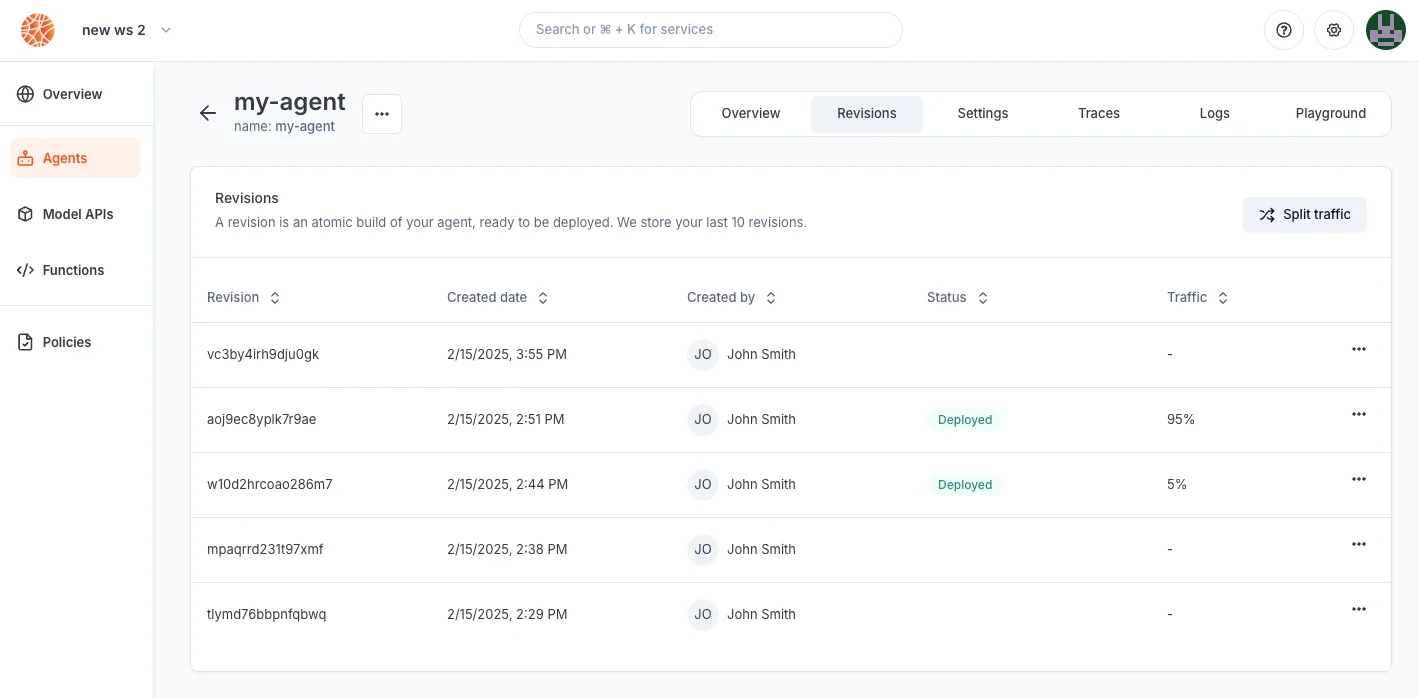 Revisions are atomic builds of your deployment that can be either deployed (accessible via the inference endpoint) or not. This system enables you to:
* **rollback a deployment** to its exact state from an earlier date
* create a revision without immediate deployment to **prepare for a future release**
* implement progressive rollout strategies, such as **canary deployments**
Important: Revisions are not the same as versions. You cannot use revisions to return to a previous configuration and branch off from it. For version control, use your preferred system (such as GitHub) alongside Blaxel.
Deployment revisions are updated following a **blue-green** paradigm. The Global Inference Network will wait for the new revision to be completely up and ready before routing requests to the new deployment. You can also set up a **canary deployment** to split traffic between two revisions (maximum of two).
Revisions are atomic builds of your deployment that can be either deployed (accessible via the inference endpoint) or not. This system enables you to:
* **rollback a deployment** to its exact state from an earlier date
* create a revision without immediate deployment to **prepare for a future release**
* implement progressive rollout strategies, such as **canary deployments**
Important: Revisions are not the same as versions. You cannot use revisions to return to a previous configuration and branch off from it. For version control, use your preferred system (such as GitHub) alongside Blaxel.
Deployment revisions are updated following a **blue-green** paradigm. The Global Inference Network will wait for the new revision to be completely up and ready before routing requests to the new deployment. You can also set up a **canary deployment** to split traffic between two revisions (maximum of two).
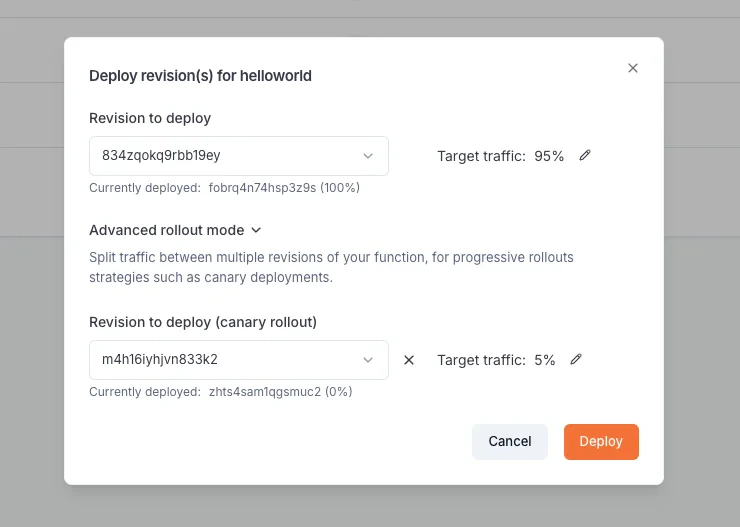 When making a deployment using Blaxel CLI (`bl deploy`), the new traffic routing depends on the `--traffic` option. Without this option specified, Blaxel will automatically deploy the new revision with full traffic (100%) if the previous deployment was the latest revision. Otherwise, it will create the revision without deploying it (0% traffic).
### Executions and inference requests
**Executions** (a.k.a inference executions) are ephemeral invocations of agent deployments by a [consumer](/Agents/Query-agents). Because Blaxel is serverless, an agent deployment is only materialized onto one of the execution locations when it actively receives and processes requests. Workload placement and request routing is fully managed by the Global Agentics Network, as defined by your [environment policies](../Model-Governance/Policies).
Read more about [querying agents in this documentation](/Agents/Query-agents).
### Deactivating an agent deployment
Any agent deployment can be deactivated at any time. When deactivated, it will **no longer be reachable** through the inference endpoint and will stop consuming resources.
Agents can be deactivated and activated at any time from the Blaxel console, or via [API](https://docs.blaxel.ai/api-reference/agents/update-agent-by-name) or [CLI](https://docs.blaxel.ai/cli-reference/bl_apply).
## Agent deployment reference
The agent deployment can be configured via the ***blaxel.toml*** file in your agent directory. This file is not mandatory; if the file is not found or a required option is not set, you will be prompted for the information during deployment.
```toml theme={null}
name = "my-agent"
workspace = "my-workspace"
type = "agent"
public = false
agents = []
functions = ["blaxel-search"]
models = ["gpt-4o-mini"]
[env]
DEFAULT_CITY = "San Francisco"
[runtime]
memory = 1024
[[triggers]]
id = "trigger-async-my-agent"
type = "http-async"
[triggers.configuration]
path = "agents/my-agent/async" # This will create this endpoint on the following base URL: https://run.blaxel.ai/{YOUR-WORKSPACE}
retry = 1
[[triggers]]
id = "trigger-my-agent"
type = "http"
[triggers.configuration]
path = "agents/my-agent/sync"
retry = 1
```
* `name`, `workspace`, and `type` fields are optional and serve as default values. Any bl command run in the folder will use these defaults rather than prompting you for input.
* `agents`, `functions`, and `models` fields are also optional. They specify which resources to deploy with the agent. These resources are preloaded during build, eliminating runtime dependencies on the Blaxel control plane and dramatically improving performance.
* `public` field specifies if the agent is publicly accessible (defaults to `false`).
* `region` field pins the agent to a specific [deployment region](../Infrastructure/Regions). This is required when attaching volumes (see below).
* `[env]` section defines environment variables that the agent can access via the SDK. Note that these are NOT [secrets](/Agents/Variables-and-secrets).
* `[runtime]` section lets you override agent deployment parameters: memory (in MB) to allocate.
* `[[volumes]]` section attaches persistent [volumes](../Sandboxes/Volumes) to the agent. See [Attach volumes to an agent](#attach-volumes-to-an-agent) below.
* `[[triggers]]` and `[triggers.configuration]` sections define ways to send requests to the agent. You can create both [synchronous and asynchronous](/Agents/Query-agents) trigger endpoints (respectively `type = "http"` or `type = "http-async"`).
A private synchronous HTTP endpoint is always created by default, even if you don’t define any trigger here.
### Pin an agent to a region
By default, agents are globally distributed across all regions allowed by your [deployment policies](../Model-Governance/Policies). You can pin an agent to a specific region by adding the `region` field to your `blaxel.toml`:
```toml blaxel.toml theme={null}
name = "my-agent"
type = "agent"
region = "us-pdx-1"
```
See [Regions](../Infrastructure/Regions) for the list of available region codes.
Pinning an agent to a region means it will only run in that region. Requests will not be routed to other regions, even if the selected region experiences higher latency for the caller.
### Attach volumes to an agent
You can attach persistent [volumes](../Sandboxes/Volumes) to an agent so it can read and write files that persist across executions. This is useful for caching data, storing model artifacts, or sharing files between runs.
To attach a volume to an agent, the agent **must be pinned to the same region** as the volume. Volumes are regional resources, and an agent must run in the same region to access them.
Add a `region` and `[[volumes]]` section to your `blaxel.toml`:
```toml blaxel.toml theme={null}
name = "my-agent"
type = "agent"
region = "us-pdx-1"
[[volumes]]
name = "my-volume"
mountPath = "/data"
```
Each volume entry requires:
| Field | Description |
| ----------- | -------------------------------------------------------------------- |
| `name` | The name of an existing volume in your workspace |
| `mountPath` | The directory path inside the agent where the volume will be mounted |
The volume must already exist before deploying. You can create one with the SDK or CLI (see [Volumes](../Sandboxes/Volumes)).
### Deployment manifests (advanced usage)
When `bl deploy` runs, it generates a YAML configuration manifest automatically and deploys it to Blaxel's hosting infrastructure. You can also create custom manifest files in the `.blaxel` folder and deploy them using the following command:
```bash theme={null}
bl apply -f ./my-deployment.yaml
```
Read our [reference for agent deployments](https://docs.blaxel.ai/api-reference/agents/get-agent-by-name).
`DEADLINE_EXCEEDED` or `STARTUP TCP probe failed` errors? Check our [troubleshooting page](/troubleshooting) for possible solutions.
See an example of building and deploying an agent on Blaxel with Claude Agent SDK.
Deploy a self-hosted Claude Managed Agents environment on Blaxel.
Learn how to run inference requests on your agent.
When making a deployment using Blaxel CLI (`bl deploy`), the new traffic routing depends on the `--traffic` option. Without this option specified, Blaxel will automatically deploy the new revision with full traffic (100%) if the previous deployment was the latest revision. Otherwise, it will create the revision without deploying it (0% traffic).
### Executions and inference requests
**Executions** (a.k.a inference executions) are ephemeral invocations of agent deployments by a [consumer](/Agents/Query-agents). Because Blaxel is serverless, an agent deployment is only materialized onto one of the execution locations when it actively receives and processes requests. Workload placement and request routing is fully managed by the Global Agentics Network, as defined by your [environment policies](../Model-Governance/Policies).
Read more about [querying agents in this documentation](/Agents/Query-agents).
### Deactivating an agent deployment
Any agent deployment can be deactivated at any time. When deactivated, it will **no longer be reachable** through the inference endpoint and will stop consuming resources.
Agents can be deactivated and activated at any time from the Blaxel console, or via [API](https://docs.blaxel.ai/api-reference/agents/update-agent-by-name) or [CLI](https://docs.blaxel.ai/cli-reference/bl_apply).
## Agent deployment reference
The agent deployment can be configured via the ***blaxel.toml*** file in your agent directory. This file is not mandatory; if the file is not found or a required option is not set, you will be prompted for the information during deployment.
```toml theme={null}
name = "my-agent"
workspace = "my-workspace"
type = "agent"
public = false
agents = []
functions = ["blaxel-search"]
models = ["gpt-4o-mini"]
[env]
DEFAULT_CITY = "San Francisco"
[runtime]
memory = 1024
[[triggers]]
id = "trigger-async-my-agent"
type = "http-async"
[triggers.configuration]
path = "agents/my-agent/async" # This will create this endpoint on the following base URL: https://run.blaxel.ai/{YOUR-WORKSPACE}
retry = 1
[[triggers]]
id = "trigger-my-agent"
type = "http"
[triggers.configuration]
path = "agents/my-agent/sync"
retry = 1
```
* `name`, `workspace`, and `type` fields are optional and serve as default values. Any bl command run in the folder will use these defaults rather than prompting you for input.
* `agents`, `functions`, and `models` fields are also optional. They specify which resources to deploy with the agent. These resources are preloaded during build, eliminating runtime dependencies on the Blaxel control plane and dramatically improving performance.
* `public` field specifies if the agent is publicly accessible (defaults to `false`).
* `region` field pins the agent to a specific [deployment region](../Infrastructure/Regions). This is required when attaching volumes (see below).
* `[env]` section defines environment variables that the agent can access via the SDK. Note that these are NOT [secrets](/Agents/Variables-and-secrets).
* `[runtime]` section lets you override agent deployment parameters: memory (in MB) to allocate.
* `[[volumes]]` section attaches persistent [volumes](../Sandboxes/Volumes) to the agent. See [Attach volumes to an agent](#attach-volumes-to-an-agent) below.
* `[[triggers]]` and `[triggers.configuration]` sections define ways to send requests to the agent. You can create both [synchronous and asynchronous](/Agents/Query-agents) trigger endpoints (respectively `type = "http"` or `type = "http-async"`).
A private synchronous HTTP endpoint is always created by default, even if you don’t define any trigger here.
### Pin an agent to a region
By default, agents are globally distributed across all regions allowed by your [deployment policies](../Model-Governance/Policies). You can pin an agent to a specific region by adding the `region` field to your `blaxel.toml`:
```toml blaxel.toml theme={null}
name = "my-agent"
type = "agent"
region = "us-pdx-1"
```
See [Regions](../Infrastructure/Regions) for the list of available region codes.
Pinning an agent to a region means it will only run in that region. Requests will not be routed to other regions, even if the selected region experiences higher latency for the caller.
### Attach volumes to an agent
You can attach persistent [volumes](../Sandboxes/Volumes) to an agent so it can read and write files that persist across executions. This is useful for caching data, storing model artifacts, or sharing files between runs.
To attach a volume to an agent, the agent **must be pinned to the same region** as the volume. Volumes are regional resources, and an agent must run in the same region to access them.
Add a `region` and `[[volumes]]` section to your `blaxel.toml`:
```toml blaxel.toml theme={null}
name = "my-agent"
type = "agent"
region = "us-pdx-1"
[[volumes]]
name = "my-volume"
mountPath = "/data"
```
Each volume entry requires:
| Field | Description |
| ----------- | -------------------------------------------------------------------- |
| `name` | The name of an existing volume in your workspace |
| `mountPath` | The directory path inside the agent where the volume will be mounted |
The volume must already exist before deploying. You can create one with the SDK or CLI (see [Volumes](../Sandboxes/Volumes)).
### Deployment manifests (advanced usage)
When `bl deploy` runs, it generates a YAML configuration manifest automatically and deploys it to Blaxel's hosting infrastructure. You can also create custom manifest files in the `.blaxel` folder and deploy them using the following command:
```bash theme={null}
bl apply -f ./my-deployment.yaml
```
Read our [reference for agent deployments](https://docs.blaxel.ai/api-reference/agents/get-agent-by-name).
`DEADLINE_EXCEEDED` or `STARTUP TCP probe failed` errors? Check our [troubleshooting page](/troubleshooting) for possible solutions.
See an example of building and deploying an agent on Blaxel with Claude Agent SDK.
Deploy a self-hosted Claude Managed Agents environment on Blaxel.
Learn how to run inference requests on your agent.