> ## Documentation Index
> Fetch the complete documentation index at: https://docs.blaxel.ai/llms.txt
> Use this file to discover all available pages before exploring further.
# Deploy from GitHub
> Connect a GitHub repository to Blaxel to automatically deploy agents, MCP servers, or batch jobs on every push to a tracked branch.
As your project is ready to go to production, a typical way to manage CI/CD for your agents is to synchronize them with a GitHub repo. There are two approaches:
1. You can connect a GitHub repository to Blaxel to automatically deploy updates whenever changes are pushed to the *main* branch.
2. For more customized workflows, you can create a GitHub Actions workflow to manually deploy updates when specified conditions are met.
This integration is only available to deploy [agents](Overview).
## Deploy automatically with GitHub integration
The simplest way to start is connecting your GitHub repository through the Blaxel Console.
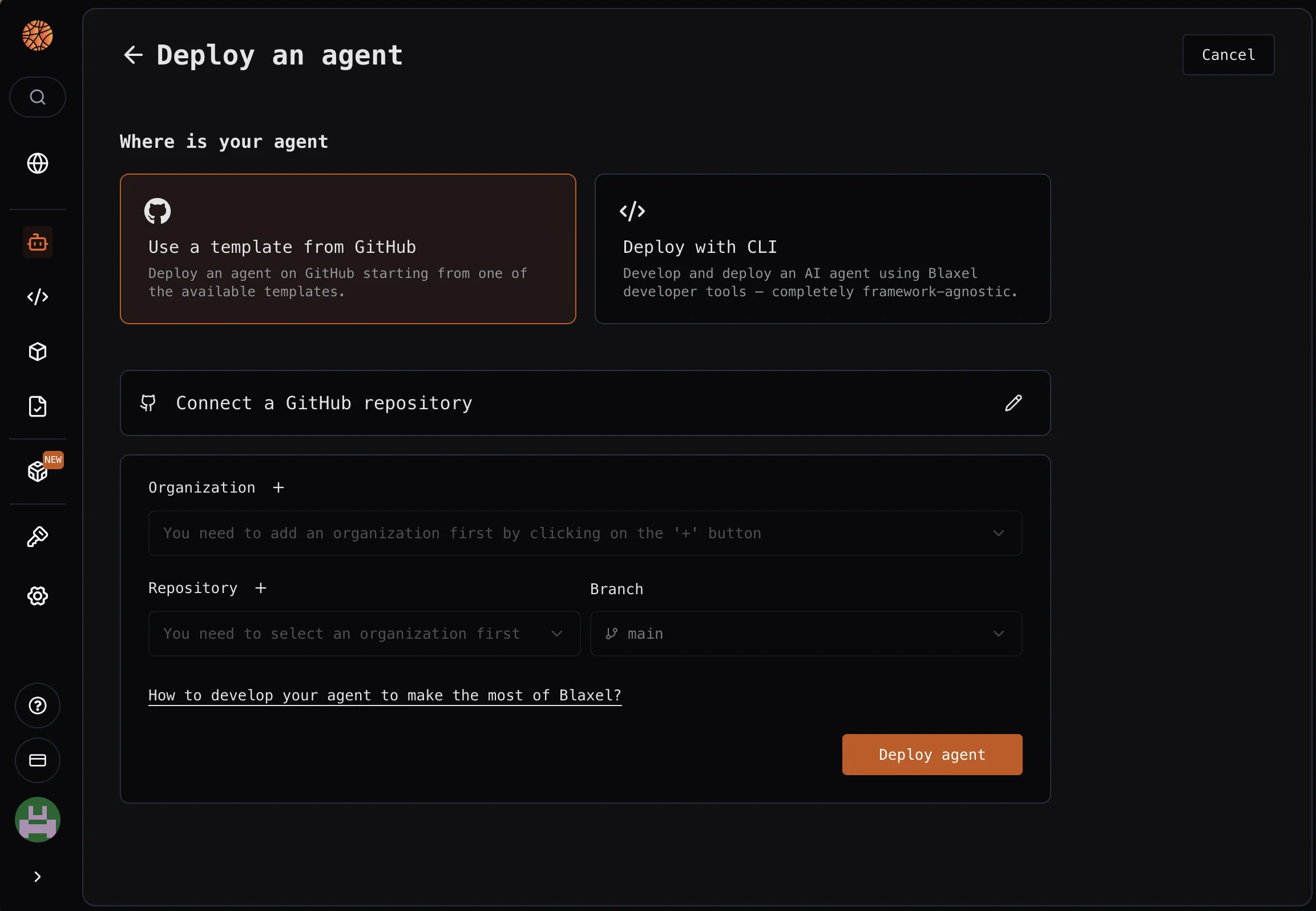 Requirements:
* Authenticate with a GitHub account that **shares the same public email address** as your current Blaxel login
This creates a GitHub action in your repository that connects to your Blaxel workspace to automatically launch a deployment when a push is made on the *main* branch.
At the moment, you can only deploy from *main*. Reach out to Blaxel if you need to deploy from other branches.
## Deploy manually with GitHub Actions
If you prefer to manage your CI/CD workflow directly, use a customized GitHub Actions workflow, as shown in the example below:
```yaml .github/workflows/blaxel-deploy.yml theme={null}
name: Deploy to Blaxel
on:
push:
branches:
- main
jobs:
deploy:
runs-on: ubuntu-latest
steps:
- name: Checkout
uses: actions/checkout@v4
- name: Install Blaxel CLI
run: curl -fsSL https://raw.githubusercontent.com/blaxel-ai/toolkit/main/install.sh | BINDIR=/usr/local/bin sh
# for security, pin to a tagged release and/or verify a checksum, e.g.:
# run: https://raw.githubusercontent.com/blaxel-ai/toolkit/v0.1.90/install.sh
- name: Deploy to Blaxel
env:
BL_API_KEY: ${{ secrets.BL_API_KEY }}
BL_WORKSPACE: ${{ secrets.BL_WORKSPACE }}
run: bl deploy
```
Ensure that `BL_API_KEY` and `BL_WORKSPACE` are defined as [secrets in your GitHub repository](https://docs.github.com/en/actions/how-tos/write-workflows/choose-what-workflows-do/use-secrets).
Requirements:
* Authenticate with a GitHub account that **shares the same public email address** as your current Blaxel login
This creates a GitHub action in your repository that connects to your Blaxel workspace to automatically launch a deployment when a push is made on the *main* branch.
At the moment, you can only deploy from *main*. Reach out to Blaxel if you need to deploy from other branches.
## Deploy manually with GitHub Actions
If you prefer to manage your CI/CD workflow directly, use a customized GitHub Actions workflow, as shown in the example below:
```yaml .github/workflows/blaxel-deploy.yml theme={null}
name: Deploy to Blaxel
on:
push:
branches:
- main
jobs:
deploy:
runs-on: ubuntu-latest
steps:
- name: Checkout
uses: actions/checkout@v4
- name: Install Blaxel CLI
run: curl -fsSL https://raw.githubusercontent.com/blaxel-ai/toolkit/main/install.sh | BINDIR=/usr/local/bin sh
# for security, pin to a tagged release and/or verify a checksum, e.g.:
# run: https://raw.githubusercontent.com/blaxel-ai/toolkit/v0.1.90/install.sh
- name: Deploy to Blaxel
env:
BL_API_KEY: ${{ secrets.BL_API_KEY }}
BL_WORKSPACE: ${{ secrets.BL_WORKSPACE }}
run: bl deploy
```
Ensure that `BL_API_KEY` and `BL_WORKSPACE` are defined as [secrets in your GitHub repository](https://docs.github.com/en/actions/how-tos/write-workflows/choose-what-workflows-do/use-secrets).