> ## Documentation Index
> Fetch the complete documentation index at: https://docs.blaxel.ai/llms.txt
> Use this file to discover all available pages before exploring further.
# Query an agent
> Call deployed agents via synchronous or asynchronous inference endpoints on the Global Agentics Network, with streaming support and configurable timeouts.
Agent [deployments](Overview) on Blaxel have a default **inference endpoint** which can be used by external consumers to request an inference execution. This inference endpoint is synchronous so the connection remains open until the end of your request is entirely processed by the agent. You can also query an asynchronous endpoint for agents, allowing to send requests that last for longer times without keeping connections open.
All inference requests are routed on the [Global Agentics Network](../Infrastructure/Global-Inference-Network) based on the [deployment policies](../Model-Governance/Policies) associated with your agent deployment.
## Inference endpoints
### Default synchronous endpoint
When you deploy an agent on Blaxel, an **inference endpoint** is automatically generated on Global Agentics Network. This endpoint operates synchronously—keeping the connection open until your agent sends its complete response. This endpoint supports both batch and streaming responses, which you can implement in your agent's code.
The inference URL looks like this:
```http Query agent theme={null}
POST https://run.blaxel.ai/{YOUR-WORKSPACE}/agents/{YOUR-AGENT}
```
Connection limit:
* The synchronous endpoint closes the connection after **100 seconds** if no data flows through the API. If your agent streams back responses, the connection resets with each chunk streamed. For example, if your agent processes a request for 5 minutes while streaming data, the connection stays open. However, if it goes 100 seconds without sending any data — even while calling external APIs — the connection will close.
* If your request processing is expected to take longer than 100 seconds without streaming data, you should use the asynchronous endpoint or [batch jobs](../Jobs/Overview) instead.
### Asynchronous endpoint
In addition to the default synchronous endpoint, Blaxel provides the ability to create **asynchronous endpoints** for handling longer-running agent requests.
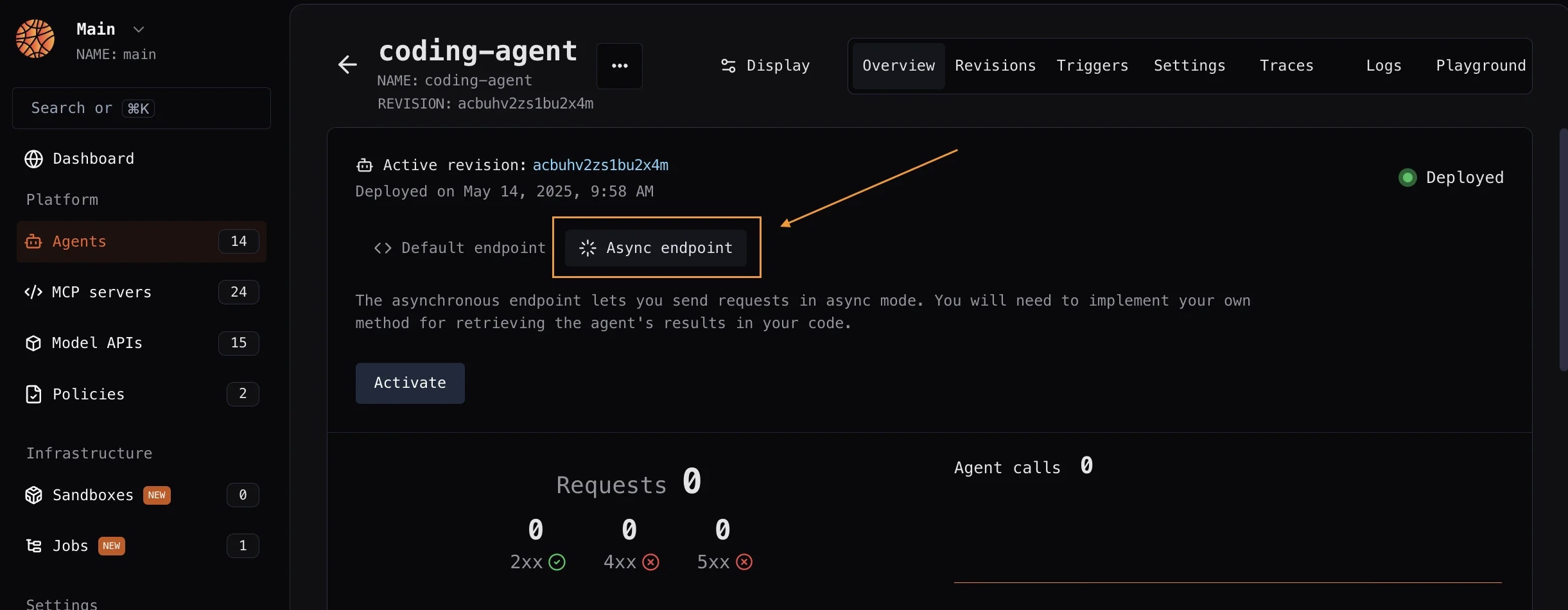 This endpoint allows you to initiate requests without maintaining an open connection throughout the entire processing duration, making it particularly useful for complex or time-intensive operations. Blaxel handles queuing and execution behind the scenes.
You are responsible for implementing your own method for retrieving the agent's results in your code. You can send results to a webhook, a database, an S3 bucket, etc. You can specify an optional callback URL to receive the result when the background job completes.
This endpoint supports requests up to 15 minutes. If your request processing is expected to take longer than this, you should use [batch jobs](../Jobs/Overview) instead.
The asynchronous endpoint looks like this:
```http Query agent (async) theme={null}
POST https://run.blaxel.ai/{YOUR-WORKSPACE}/agents/{YOUR-AGENT}?async=true
```
You can create async endpoints either from the Blaxel Console, or from your code in the `blaxel.toml` file. For more information, read the [documentation on asynchronous triggers](./Asynchronous-triggers).
The agent deployment can be configured via the `blaxel.toml` file in your agent directory. This file is not mandatory; if the file is not found or a required option is not set, you will be prompted for the information during deployment.
```toml theme={null}
name = "my-agent"
workspace = "my-workspace"
type = "agent"
public = false
agents = []
functions = ["blaxel-search"]
models = ["gpt-4o-mini"]
[env]
DEFAULT_CITY = "San Francisco"
[runtime]
memory = 1024
[[triggers]]
id = "trigger-async-my-agent"
type = "http-async"
[triggers.configuration]
path = "agents/my-agent/async" # This will create this endpoint on the following base URL: https://run.blaxel.ai/{YOUR-WORKSPACE}
retry = 1
[[triggers]]
id = "trigger-my-agent"
type = "http"
[triggers.configuration]
path = "agents/my-agent/sync"
retry = 1
```
* `name`, `workspace`, and `type` fields are optional and serve as default values. Any bl command run in the folder will use these defaults rather than prompting you for input.
* `agents`, `functions`, and `models` fields are also optional. They specify which resources to deploy with the agent. These resources are preloaded during build, eliminating runtime dependencies on the Blaxel control plane and dramatically improving performance.
* `public` field specifies if the agent is publicly accessible (defaults to `false`).
* `[env]` section defines environment variables that the agent can access via the SDK. Note that these are NOT [secrets](/Agents/Variables-and-secrets).
* `[runtime]` section lets you override agent deployment parameters: memory (in MB) to allocate.
* `[[triggers]]` and `[triggers.configuration]` sections define ways to send requests to the agent. You can create both [synchronous and asynchronous](/Agents/Query-agents) trigger endpoints (respectively `type = "http"` or `type = "http-async"`). A private synchronous HTTP endpoint is always created by default, even if you don’t define any trigger here.
### Endpoint authentication
By default, agents deployed on Blaxel **aren’t public**. It is necessary to authenticate all inference requests, via a [bearer token](../Security/Access-tokens).
The evaluation of authentication/authorization for inference requests is managed by the Global Agentics Network based on the [access given in your workspace](../Security/Workspace-access-control).
See how to remove authentication on a deployed agent down below.
### Manage sessions
To simulate multi-turn conversations, you can pass on request headers. You'll need your client to generate this ID and pass it using any header which you can retrieve via the code (e.g. `Thread-Id`). Without a thread ID, the agent won't maintain nor use any conversation memory when processing the request.
## Make an agent public
To make an agent publicly accessible, add the `public` field to the root of the `blaxel.toml` configuration file, as explained above:
```toml blaxel.toml {7} theme={null}
public = true
[[triggers]]
id = "http"
type = "http"
[triggers.configuration]
path = "/" # This will be translated to https://run.blaxel.ai//
```
## Make an inference request
### Blaxel API
Make a **POST** request to the default inference endpoint for the agent deployment you are requesting, making sure to fill in the authentication token:
```bash theme={null}
curl 'https://run.blaxel.ai/YOUR-WORKSPACE/agents/YOUR-AGENT?environment=YOUR-ENVIRONMENT' \
-H 'accept: application/json, text/plain, */*' \
-H 'X-Blaxel-Authorization: Bearer YOUR-TOKEN' \
-H 'X-Blaxel-Workspace: YOUR-WORKSPACE' \
--data-raw $'{"inputs":"Enter your input here."}'
```
Read about [the API parameters in the reference](https://docs.blaxel.ai/api-reference/inference).
### Blaxel CLI
The following command will make a default POST request to the agent.
```bash theme={null}
bl run agent your-agent --data '{"inputs":"Enter your input here."}'
```
Read about [the CLI parameters in the reference](https://docs.blaxel.ai/cli-reference/bl_run).
### Blaxel console
Inference requests can be made from the Blaxel console from the agent deployment’s **Playground** page.
See an example of building and deploying an agent on Blaxel with Claude Agent SDK.
This endpoint allows you to initiate requests without maintaining an open connection throughout the entire processing duration, making it particularly useful for complex or time-intensive operations. Blaxel handles queuing and execution behind the scenes.
You are responsible for implementing your own method for retrieving the agent's results in your code. You can send results to a webhook, a database, an S3 bucket, etc. You can specify an optional callback URL to receive the result when the background job completes.
This endpoint supports requests up to 15 minutes. If your request processing is expected to take longer than this, you should use [batch jobs](../Jobs/Overview) instead.
The asynchronous endpoint looks like this:
```http Query agent (async) theme={null}
POST https://run.blaxel.ai/{YOUR-WORKSPACE}/agents/{YOUR-AGENT}?async=true
```
You can create async endpoints either from the Blaxel Console, or from your code in the `blaxel.toml` file. For more information, read the [documentation on asynchronous triggers](./Asynchronous-triggers).
The agent deployment can be configured via the `blaxel.toml` file in your agent directory. This file is not mandatory; if the file is not found or a required option is not set, you will be prompted for the information during deployment.
```toml theme={null}
name = "my-agent"
workspace = "my-workspace"
type = "agent"
public = false
agents = []
functions = ["blaxel-search"]
models = ["gpt-4o-mini"]
[env]
DEFAULT_CITY = "San Francisco"
[runtime]
memory = 1024
[[triggers]]
id = "trigger-async-my-agent"
type = "http-async"
[triggers.configuration]
path = "agents/my-agent/async" # This will create this endpoint on the following base URL: https://run.blaxel.ai/{YOUR-WORKSPACE}
retry = 1
[[triggers]]
id = "trigger-my-agent"
type = "http"
[triggers.configuration]
path = "agents/my-agent/sync"
retry = 1
```
* `name`, `workspace`, and `type` fields are optional and serve as default values. Any bl command run in the folder will use these defaults rather than prompting you for input.
* `agents`, `functions`, and `models` fields are also optional. They specify which resources to deploy with the agent. These resources are preloaded during build, eliminating runtime dependencies on the Blaxel control plane and dramatically improving performance.
* `public` field specifies if the agent is publicly accessible (defaults to `false`).
* `[env]` section defines environment variables that the agent can access via the SDK. Note that these are NOT [secrets](/Agents/Variables-and-secrets).
* `[runtime]` section lets you override agent deployment parameters: memory (in MB) to allocate.
* `[[triggers]]` and `[triggers.configuration]` sections define ways to send requests to the agent. You can create both [synchronous and asynchronous](/Agents/Query-agents) trigger endpoints (respectively `type = "http"` or `type = "http-async"`). A private synchronous HTTP endpoint is always created by default, even if you don’t define any trigger here.
### Endpoint authentication
By default, agents deployed on Blaxel **aren’t public**. It is necessary to authenticate all inference requests, via a [bearer token](../Security/Access-tokens).
The evaluation of authentication/authorization for inference requests is managed by the Global Agentics Network based on the [access given in your workspace](../Security/Workspace-access-control).
See how to remove authentication on a deployed agent down below.
### Manage sessions
To simulate multi-turn conversations, you can pass on request headers. You'll need your client to generate this ID and pass it using any header which you can retrieve via the code (e.g. `Thread-Id`). Without a thread ID, the agent won't maintain nor use any conversation memory when processing the request.
## Make an agent public
To make an agent publicly accessible, add the `public` field to the root of the `blaxel.toml` configuration file, as explained above:
```toml blaxel.toml {7} theme={null}
public = true
[[triggers]]
id = "http"
type = "http"
[triggers.configuration]
path = "/" # This will be translated to https://run.blaxel.ai//
```
## Make an inference request
### Blaxel API
Make a **POST** request to the default inference endpoint for the agent deployment you are requesting, making sure to fill in the authentication token:
```bash theme={null}
curl 'https://run.blaxel.ai/YOUR-WORKSPACE/agents/YOUR-AGENT?environment=YOUR-ENVIRONMENT' \
-H 'accept: application/json, text/plain, */*' \
-H 'X-Blaxel-Authorization: Bearer YOUR-TOKEN' \
-H 'X-Blaxel-Workspace: YOUR-WORKSPACE' \
--data-raw $'{"inputs":"Enter your input here."}'
```
Read about [the API parameters in the reference](https://docs.blaxel.ai/api-reference/inference).
### Blaxel CLI
The following command will make a default POST request to the agent.
```bash theme={null}
bl run agent your-agent --data '{"inputs":"Enter your input here."}'
```
Read about [the CLI parameters in the reference](https://docs.blaxel.ai/cli-reference/bl_run).
### Blaxel console
Inference requests can be made from the Blaxel console from the agent deployment’s **Playground** page.
See an example of building and deploying an agent on Blaxel with Claude Agent SDK.