> ## Documentation Index
> Fetch the complete documentation index at: https://docs.blaxel.ai/llms.txt
> Use this file to discover all available pages before exploring further.
# Dedicated egress gateways
> Attach dedicated egress IP addresses to Blaxel workloads so outbound traffic from sandboxes, agents, and jobs uses predictable, allowlistable IPs.
This feature is currently in private preview and is not intended for production use. In private preview, it has the following limitations:
* It is only available for sandboxes.
* Egress gateway assignment is only possible at sandbox creation time.
* Egress gateway removal is only possible by deleting the corresponding sandbox.
For more information, [contact us on Discord](https://discord.gg/G3NqzUPcHP) or [request access](https://blaxel.ai/contact?message=I%20want%20to%20get%20preview%20access%20to%20dedicated%20egress%20IPs%20for%20the%20following%20use%20case%3A).
Dedicated egress gateways enable customers to exclusively attach IP addresses to sandboxes within their workspace. This makes it possible to whitelist outbound traffic from Blaxel's systems for use in downstream providers and eliminates the need for workarounds such as self-hosted proxy servers or VPNs.
A single egress IP address supports up to 32,000 sandboxes. It is also possible to group IP addresses into pools to automatically load-balance outbound traffic for high-demand workloads.
Sandboxes that do not have a dedicated egress gateway will use the shared [public IP addresses](./Regions#public-ip-addresses) instead.
## Order an egress gateway
Egress gateway configuration takes place from the [Blaxel Console](https://app.blaxel.ai).
* Navigate to **Network** > **Egress gateways**.
* Click the **Order IP** button in the top right corner.
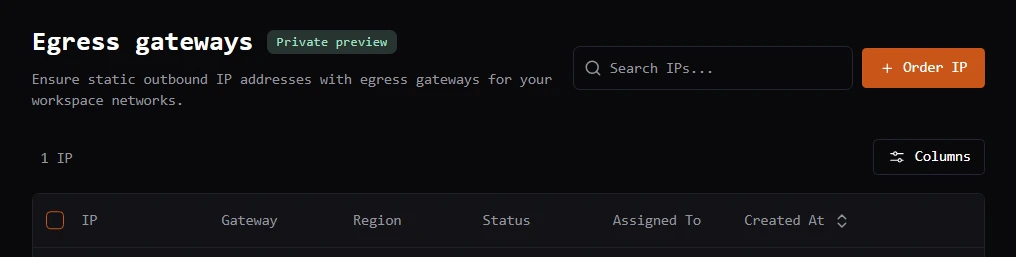 * Select the quantity and egress gateway region.
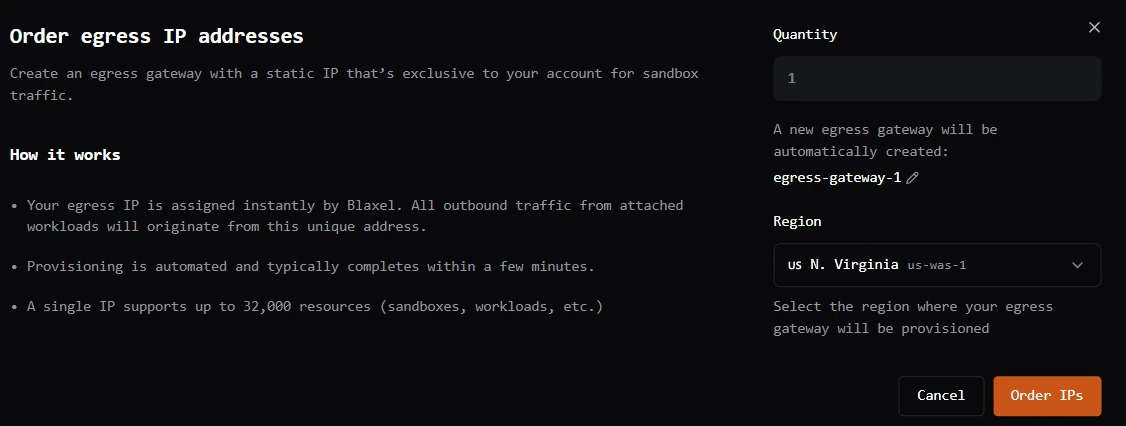 Provisioning is automated and typically completes within a few minutes.
## Assign an egress gateway to a sandbox
Once provisioning is complete, you can attach the assigned egress gateway when creating one or more sandboxes. All outbound traffic from the attached sandboxes will then originate from this unique address.
You can assign an egress gateway to a sandbox at creation time via the Blaxel Console or via the Blaxel SDK.
### Blaxel Console
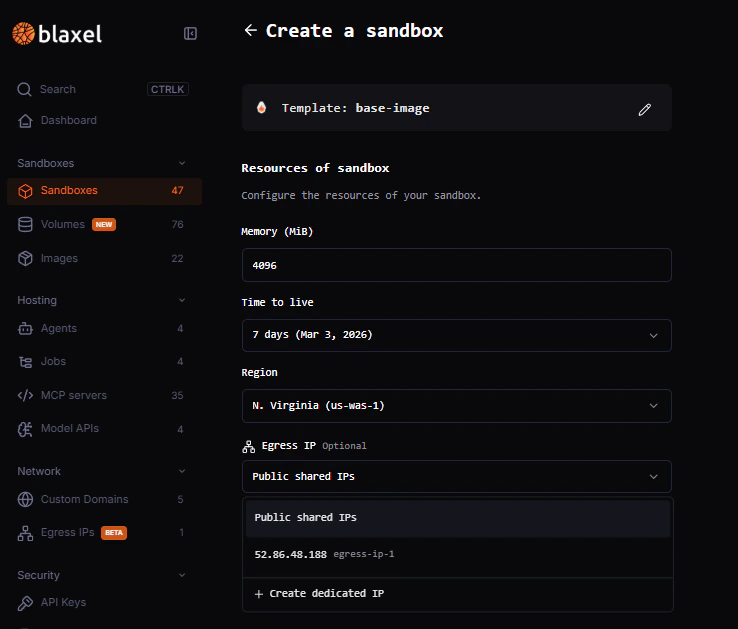
When creating a new sandbox via the Blaxel Console, use the **Egress IP** drop-down to assign an available egress gateway to that sandbox. Only egress gateways in the same region as the new sandbox are shown for assignment.
Provisioning is automated and typically completes within a few minutes.
## Assign an egress gateway to a sandbox
Once provisioning is complete, you can attach the assigned egress gateway when creating one or more sandboxes. All outbound traffic from the attached sandboxes will then originate from this unique address.
You can assign an egress gateway to a sandbox at creation time via the Blaxel Console or via the Blaxel SDK.
### Blaxel Console
When creating a new sandbox via the Blaxel Console, use the **Egress IP** drop-down to assign an available egress gateway to that sandbox. Only egress gateways in the same region as the new sandbox are shown for assignment.
 ### Blaxel SDK
When creating a new sandbox via the Blaxel SDK, you can assign it to a dedicated egress gateway by passing a `network` option when creating the sandbox. Here is an example when creating a sandbox:
```typescript TypeScript theme={null}
import { SandboxInstance } from "@blaxel/core";
const sandbox = await SandboxInstance.create({
name: "my-sandbox",
image: "blaxel/base-image:latest",
memory: 4096,
region: "eu-fra-1",
network: {
egress: {
mode: "dedicated",
gateway: "egress-gateway-4"
}
},
});
```
```python Python theme={null}
import asyncio
from blaxel.core.sandbox import SandboxInstance
async def main():
sandbox = await SandboxInstance.create(
{
"name": "my-sandbox",
"image": "blaxel/base-image:latest",
"memory": 4096,
"region": "eu-fra-1",
"network": {
"egress": {
"mode": "dedicated",
"gateway": "egress-gateway-4",
},
},
}
)
asyncio.run(main())
```
### Blaxel SDK
When creating a new sandbox via the Blaxel SDK, you can assign it to a dedicated egress gateway by passing a `network` option when creating the sandbox. Here is an example when creating a sandbox:
```typescript TypeScript theme={null}
import { SandboxInstance } from "@blaxel/core";
const sandbox = await SandboxInstance.create({
name: "my-sandbox",
image: "blaxel/base-image:latest",
memory: 4096,
region: "eu-fra-1",
network: {
egress: {
mode: "dedicated",
gateway: "egress-gateway-4"
}
},
});
```
```python Python theme={null}
import asyncio
from blaxel.core.sandbox import SandboxInstance
async def main():
sandbox = await SandboxInstance.create(
{
"name": "my-sandbox",
"image": "blaxel/base-image:latest",
"memory": 4096,
"region": "eu-fra-1",
"network": {
"egress": {
"mode": "dedicated",
"gateway": "egress-gateway-4",
},
},
}
)
asyncio.run(main())
```