> ## Documentation Index
> Fetch the complete documentation index at: https://docs.blaxel.ai/llms.txt
> Use this file to discover all available pages before exploring further.
# Log streaming
> Retrieve process output logs from sandboxes in batch or real-time streaming mode using the Blaxel SDK in TypeScript, Python, or Go.
Logging provides developers with visibility into process outputs within sandboxes. You can retrieve logs either in batch or streaming.
Complete code examples demonstrating all operations are available on Blaxel's GitHub: [in TypeScript](https://github.com/blaxel-ai/sdk-typescript/tree/main/tests/sandbox), [in Python](https://github.com/blaxel-ai/sdk-python/tree/main/tests/integration/sandbox), and [in Go](https://github.com/blaxel-ai/sdk-go/tree/main/integration_tests).
The Blaxel SDK requires two environment variables to authenticate:
| Variable | Description |
| -------------- | -------------------------- |
| `BL_WORKSPACE` | Your Blaxel workspace name |
| `BL_API_KEY` | Your Blaxel API key |
You can create an API key from the [Blaxel console](https://app.blaxel.ai/profile/security). Your workspace name is visible in the URL when you log in to the console (e.g. `app.blaxel.ai/{workspace}`).
Set them as environment variables or add them to a `.env` file at the root of your project:
```bash theme={null}
export BL_WORKSPACE=my-workspace
export BL_API_KEY=my-api-key
```
The Blaxel SDK does not accept credentials as constructor arguments. Credentials must come from environment variables, a `.env` file, or a local CLI login session (see below).
When developing locally, you can also **log in to your workspace with Blaxel CLI** (as shown above). This allows you to run Blaxel SDK functions that will automatically connect to your workspace without additional setup. When you deploy on Blaxel, authentication is handled automatically — no environment variables needed.
## In batch
### Retrieve from the execution object
Logs for a [process](/Sandboxes/Processes) are available in the *process execution* object **if** the process is started with the `waitForCompletion: true` / `"wait_for_completion": True` parameter.
Both standard output (stdout) and standard error (stderr) are surfaced:
```typescript TypeScript theme={null}
import { SandboxInstance } from "@blaxel/core";
const sandbox = await SandboxInstance.get("my-sandbox");
const process = await sandbox.process.exec({
name: "hello-process",
command: "echo 'Hello, World!'",
waitForCompletion: true
});
console.log(process.logs);
```
```python Python theme={null}
from blaxel.core import SandboxInstance
sandbox = await SandboxInstance.get("my-sandbox")
process = await sandbox.process.exec({
"name": "hello-process",
"command": "echo 'Hello, World!'",
"waitForCompletion": True
})
print(process.logs)
```
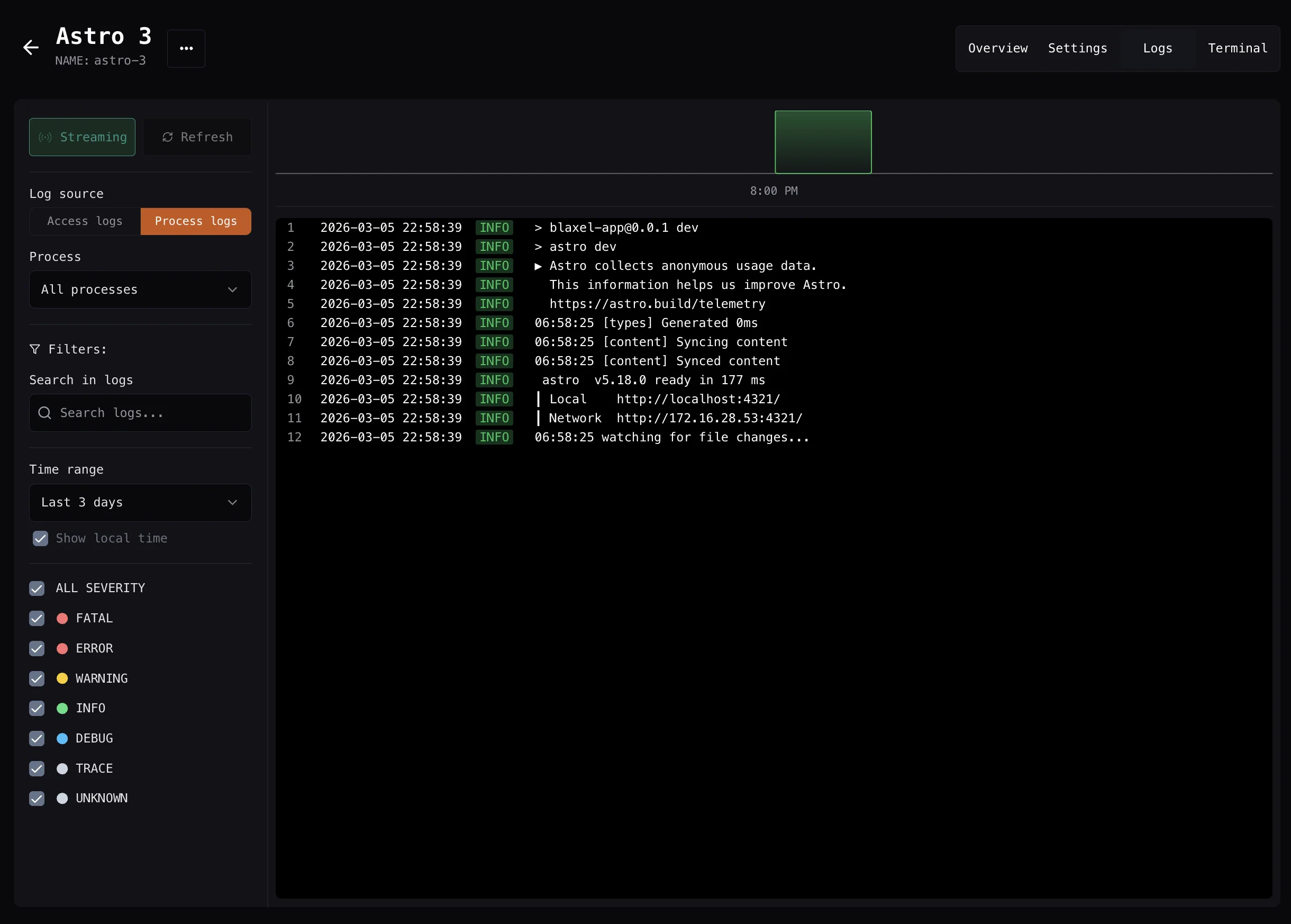
Process execution logs are also visible in the Blaxel Console. Refer to the **Logs** section of the sandbox detail page, as shown below:
 ### Retrieve from a completed process name or ID
Retrieve logs for a specific [process](/Sandboxes/Processes) (using either its name or process ID) after it has completed execution. By default, this retrieves standard output (**stdout**) only:
```typescript TypeScript theme={null}
const process = await sandbox.process.exec({
name: "hello-process",
command: "echo 'Hello, World!'"
});
const logs = await sandbox.process.logs("hello-process");
```
```python Python theme={null}
process = await sandbox.process.exec({
"name": "hello-process",
"command": "echo 'Hello, World!'"
})
logs = await sandbox.process.logs("hello-process")
```
To retrieve standard error (**stderr**):
```typescript TypeScript theme={null}
const errorLogs = await sandbox.process.logs("hello-process", "stderr");
```
```python Python theme={null}
error_logs = await sandbox.process.logs("hello-process", "stderr")
```
To retrieve both *stderr* and *stdout*:
```typescript TypeScript theme={null}
const allLogs = await sandbox.process.logs("hello-process", "all");
```
```python Python theme={null}
all_logs = await sandbox.process.logs("hello-process", "all")
```
## Streaming
### Retrieve via a callback function
The callback handlers receive log entries in real-time as they're generated by the process:
* **onLog/on\_log**: Receives complete log objects with additional metadata
This method ensures you get a full view, as it first **backfills with all past logs** before beginning the real-time stream.
This approach is ideal for long-running processes where you need to monitor progress or respond to specific log events during execution.
```typescript TypeScript theme={null}
await sandbox.process.exec({
name: "streaming-demo",
command: "echo 'Starting process'; sleep 2; echo 'Processing...'; sleep 2; echo 'Completed!
onLog: (log) => {
console.log(`LOG: ${JSON.stringify(log)}`);
}
});
```
```python Python theme={null}
def on_log(log):
print(f"LOG: {log}")
await sandbox.process.exec({
"name": "streaming-demo",
"command": "echo 'Starting process'; sleep 2; echo 'Processing...'; sleep 2; echo 'Completed!'",
"on_log": on_log
})
```
### Retrieve from a process name or ID
Stream logs for a specific [process](/Sandboxes/Processes) (using either its name or process ID):
```typescript TypeScript theme={null}
// Start a long-running process
await sandbox.process.exec({
name: "stream-demo",
command: "sh -c 'for i in $(seq 1 5); do echo \"Output $i\"; sleep 1; done'"
});
const stream = sandbox.process.streamLogs("stream-demo", {
onLog: (log) => console.log("Log:", log),
onStdout: (stdout) => console.log("Stdout:", stdout),
onStderr: (stderr) => console.log("Stderr:", stderr)
});
// Wait for completion and cleanup
await sandbox.process.wait("stream-demo");
stream.close();
```
```python Python theme={null}
# Start a long-running process
await sandbox.process.exec({
"name": "stream-demo",
"command": "sh -c 'for i in $(seq 1 5); do echo \"Output $i\"; sleep 1; done'"
})
stream = sandbox.process.stream_logs("stream-demo", {
"on_log": lambda log: print(f"Log: {log}"),
"on_stdout": lambda stdout: print(f"Stdout: {stdout}"),
"on_stderr": lambda stderr: print(f"Stderr: {stderr}")
})
# Wait for completion and cleanup
await sandbox.process.wait("stream-demo")
stream["close"]()
```
### Retrieve from a completed process name or ID
Retrieve logs for a specific [process](/Sandboxes/Processes) (using either its name or process ID) after it has completed execution. By default, this retrieves standard output (**stdout**) only:
```typescript TypeScript theme={null}
const process = await sandbox.process.exec({
name: "hello-process",
command: "echo 'Hello, World!'"
});
const logs = await sandbox.process.logs("hello-process");
```
```python Python theme={null}
process = await sandbox.process.exec({
"name": "hello-process",
"command": "echo 'Hello, World!'"
})
logs = await sandbox.process.logs("hello-process")
```
To retrieve standard error (**stderr**):
```typescript TypeScript theme={null}
const errorLogs = await sandbox.process.logs("hello-process", "stderr");
```
```python Python theme={null}
error_logs = await sandbox.process.logs("hello-process", "stderr")
```
To retrieve both *stderr* and *stdout*:
```typescript TypeScript theme={null}
const allLogs = await sandbox.process.logs("hello-process", "all");
```
```python Python theme={null}
all_logs = await sandbox.process.logs("hello-process", "all")
```
## Streaming
### Retrieve via a callback function
The callback handlers receive log entries in real-time as they're generated by the process:
* **onLog/on\_log**: Receives complete log objects with additional metadata
This method ensures you get a full view, as it first **backfills with all past logs** before beginning the real-time stream.
This approach is ideal for long-running processes where you need to monitor progress or respond to specific log events during execution.
```typescript TypeScript theme={null}
await sandbox.process.exec({
name: "streaming-demo",
command: "echo 'Starting process'; sleep 2; echo 'Processing...'; sleep 2; echo 'Completed!
onLog: (log) => {
console.log(`LOG: ${JSON.stringify(log)}`);
}
});
```
```python Python theme={null}
def on_log(log):
print(f"LOG: {log}")
await sandbox.process.exec({
"name": "streaming-demo",
"command": "echo 'Starting process'; sleep 2; echo 'Processing...'; sleep 2; echo 'Completed!'",
"on_log": on_log
})
```
### Retrieve from a process name or ID
Stream logs for a specific [process](/Sandboxes/Processes) (using either its name or process ID):
```typescript TypeScript theme={null}
// Start a long-running process
await sandbox.process.exec({
name: "stream-demo",
command: "sh -c 'for i in $(seq 1 5); do echo \"Output $i\"; sleep 1; done'"
});
const stream = sandbox.process.streamLogs("stream-demo", {
onLog: (log) => console.log("Log:", log),
onStdout: (stdout) => console.log("Stdout:", stdout),
onStderr: (stderr) => console.log("Stderr:", stderr)
});
// Wait for completion and cleanup
await sandbox.process.wait("stream-demo");
stream.close();
```
```python Python theme={null}
# Start a long-running process
await sandbox.process.exec({
"name": "stream-demo",
"command": "sh -c 'for i in $(seq 1 5); do echo \"Output $i\"; sleep 1; done'"
})
stream = sandbox.process.stream_logs("stream-demo", {
"on_log": lambda log: print(f"Log: {log}"),
"on_stdout": lambda stdout: print(f"Stdout: {stdout}"),
"on_stderr": lambda stderr: print(f"Stderr: {stderr}")
})
# Wait for completion and cleanup
await sandbox.process.wait("stream-demo")
stream["close"]()
```