> ## Documentation Index
> Fetch the complete documentation index at: https://docs.blaxel.ai/llms.txt
> Use this file to discover all available pages before exploring further.
# Real-time previews
> Render an application in real-time through a direct preview URL backed by a running Blaxel sandbox, with optional auth and custom domains.
Sometimes you may need to access a running sandbox application and preview the content in real time in a front-end client. This is useful for example to instantly preview React code generated by a codegen AI agent.
You can do this via a **preview URL** that routes to a specific port on your sandbox (e.g. *port 3000* for `npm run dev -- --host $HOST --port 3000 &`). This preview URL can be either **public** (does not require you to be authenticated to access it) or **private** (see below).
They will look something like this:
```text theme={null}
https://tkmu0oj2bf6iuoag6mmlt8.us-pdx-1.preview.bl.run
```
You can have multiple preview URLs per sandbox.
If you see a 502 error when accessing the preview URL, the most common cause is that your application server is not reachable externally. To resolve this, configure your server to bind to the address provided by the `HOST` environment variable, which Blaxel injects into the sandbox, rather than a static value. If you need a static fallback (for example when running the same code outside a sandbox), use `::` so it listens on all available network interfaces over both IPv4 and IPv6 (use `0.0.0.0` only if you specifically need to restrict the server to IPv4). Note that not every server or dev tool accepts a bare `::` as a host value — confirm your specific tool supports IPv6 wildcard binding before relying on it. Sample server startup commands are shown below:
```tsx TypeScript theme={null}
npm run dev -- --host $HOST
# or
npm serve -- --host $HOST
```
```python Python theme={null}
python main.py --host $HOST
```
Read more about this in our [troubleshooting page](/troubleshooting).
You can also set a **custom domain** on a preview URL (see down below).
## Current limitations of real-time previews
JavaScript module bundlers handle real-time previewing. Here are the key compatibility requirements and limitations:
* Module bundler **must implement** [ping-pong](https://datatracker.ietf.org/doc/html/rfc6455#section-5.5.2).
* Both [Webpack](https://webpack.js.org/) and [Turbopack](https://nextjs.org/docs/app/api-reference/turbopack) (v16.1.1) have been tested and confirmed to work.
* Blaxel has a **15-minute connection timeout**. To maintain previews beyond this limit, ensure your bundler implements automatic reconnection.
* You cannot create a preview on **port 80** which is reserved for system.
Using a Webpack server but unable to hot reload your previews? Check our [troubleshooting page](/troubleshooting) for possible solutions.
## Private preview URLs
When you create a private preview URL a token is required to access the URL. You must include the token as:
* a `bl_preview_token` query parameter when accessing the preview URL (e.g. *[https://tkmu0oj2bf6iuoag6mmlt8.preview.bl.run/health?bl\_preview\_token=\{token.value}](https://tkmu0oj2bf6iuoag6mmlt8.preview.bl.run/health?bl_preview_token=\{token.value})*)
* a `X-Blaxel-Preview-Token` header
## Manage preview URLs
To whitelist sandbox traffic in your network, you can [retrieve the public IP addresses](/Infrastructure/Regions#public-ip-addresses) used by Blaxel.
### Blaxel console
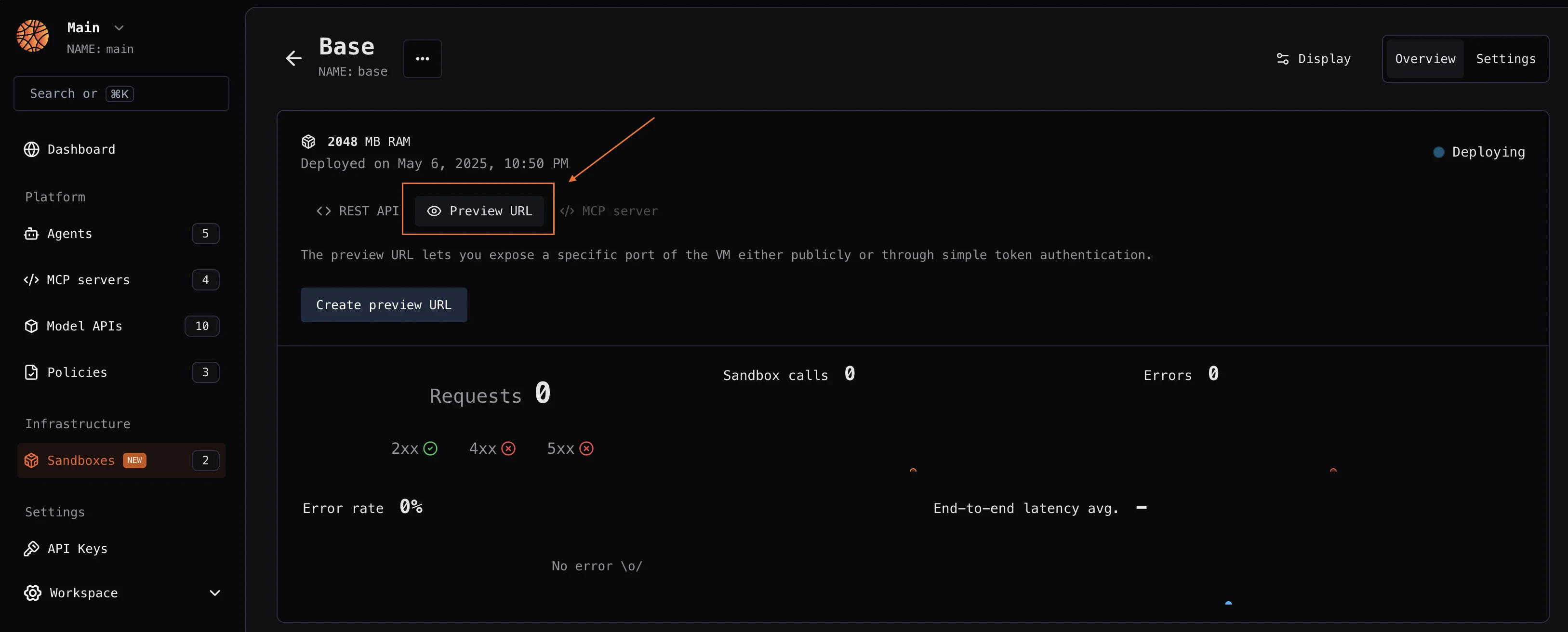
You can create a preview URL for a sandbox from the Blaxel Console, on the overview of a sandbox:
 ### Blaxel SDK
The Blaxel SDK requires two environment variables to authenticate:
| Variable | Description |
| -------------- | -------------------------- |
| `BL_WORKSPACE` | Your Blaxel workspace name |
| `BL_API_KEY` | Your Blaxel API key |
You can create an API key from the [Blaxel console](https://app.blaxel.ai/profile/security). Your workspace name is visible in the URL when you log in to the console (e.g. `app.blaxel.ai/{workspace}`).
Set them as environment variables or add them to a `.env` file at the root of your project:
```bash theme={null}
export BL_WORKSPACE=my-workspace
export BL_API_KEY=my-api-key
```
The Blaxel SDK does not accept credentials as constructor arguments. Credentials must come from environment variables, a `.env` file, or a local CLI login session (see below).
When developing locally, you can also **log in to your workspace with Blaxel CLI** (as shown above). This allows you to run Blaxel SDK functions that will automatically connect to your workspace without additional setup. When you deploy on Blaxel, authentication is handled automatically — no environment variables needed.
The recommended pattern for preview creation is `createIfNotExists()` / `create_if_not_exists()`. Blaxel first checks for an existing preview with the provided `name` and either returns it or creates a new one using your specified configuration.
Create and manage a sandbox’s public preview URL:
```typescript TypeScript theme={null}
import { SandboxInstance } from "@blaxel/core";
const sandbox = await SandboxInstance.get("my-sandbox");
// Create public preview
const preview = await sandbox.previews.createIfNotExists({
metadata: { name: "app-preview" },
spec: {
port: 3000,
public: true,
responseHeaders: {
"Access-Control-Allow-Origin": "https://YOUR-DOMAIN",
"Access-Control-Allow-Methods": "GET, POST, PUT, DELETE, OPTIONS, PATCH",
"Access-Control-Allow-Headers": "Content-Type, Authorization, X-Requested-With, X-Blaxel-Workspace, X-Blaxel-Preview-Token, X-Blaxel-Authorization",
"Access-Control-Allow-Credentials": "true",
"Access-Control-Expose-Headers": "Content-Length, X-Request-Id",
"Access-Control-Max-Age": "86400",
"Vary": "Origin"
}
}
});
// Get preview URL
const url = preview.spec?.url;
```
```python Python theme={null}
from blaxel.core import SandboxInstance
sandbox = await SandboxInstance.get("my-sandbox")
# Create public preview
preview = await sandbox.previews.create_if_not_exists({
"metadata": {"name": "app-preview"},
"spec": {
"port": 3000,
"public": True,
"responseHeaders": {
"Access-Control-Allow-Origin": "https://YOUR-DOMAIN",
"Access-Control-Allow-Methods": "GET, POST, PUT, DELETE, OPTIONS, PATCH",
"Access-Control-Allow-Headers": "Content-Type, Authorization, X-Requested-With, X-Blaxel-Workspace, X-Blaxel-Preview-Token, X-Blaxel-Authorization",
"Access-Control-Allow-Credentials": "true",
"Access-Control-Expose-Headers": "Content-Length, X-Request-Id",
"Access-Control-Max-Age": "86400",
"Vary": "Origin"
}
}
})
# Get preview URL
url = preview.spec.url
```
Or create a private preview:
```typescript TypeScript theme={null}
import { SandboxInstance } from "@blaxel/core";
const sandbox = await SandboxInstance.get("my-sandbox");
// Create private preview
const preview = await sandbox.previews.createIfNotExists({
metadata: { name: "private-preview" },
spec: {
port: 3000,
public: false
}
});
// Create access token (10 minutes expiry)
const expiresAt = new Date(Date.now() + 10 * 60 * 1000);
const token = await preview.tokens.create(expiresAt);
// How to access the preview with the token
const url = preview.spec?.url;
const response = await fetch(`${url}/health?bl_preview_token=${token.value}`);
```
```python Python theme={null}
import httpx
from blaxel.core import SandboxInstance
from datetime import datetime, timedelta, UTC
sandbox = await SandboxInstance.get("my-sandbox")
# Create private preview
preview = await sandbox.previews.create_if_not_exists({
"metadata": {"name": "private-preview"},
"spec": {
"port": 3000,
"public": False
}
})
# Create access token (10 minutes expiry)
expires_at = datetime.now(UTC) + timedelta(minutes=10)
token = await preview.tokens.create(expires_at)
# How to access the preview with the token
url = preview.spec.url
async with httpx.AsyncClient() as client:
response = await client.get(f"{url}/health?bl_preview_token={token.value}")
```
An alternative is to use `create()`, which raises an error when a preview with the specified name already exists:
```typescript TypeScript theme={null}
const preview = await sandbox.previews.create({
metadata: {
name: "preview-name"
},
spec: {
port: 443,
public: false
}
})
```
```python Python theme={null}
preview = await sandbox.previews.create({
"metadata": {
"name": "preview-name"
},
"spec": {
"port": 443,
"public": False
}
})
```
### URL prefix
You can customize the preview URL with a custom string prefix using the `prefixUrl` argument:
```typescript TypeScript theme={null}
const sandbox = await SandboxInstance.get("my-sandbox");
const preview = await sandbox.previews.createIfNotExists({
metadata: { name: "app-preview" },
spec: {
port: 3000,
public: true,
prefixUrl: "my-prefix"
}
});
```
```python Python theme={null}
sandbox = await SandboxInstance.get("my-sandbox")
preview = await sandbox.previews.create_if_not_exists({
"metadata": {"name": "app-preview"},
"spec": {
"port": 3000,
"public": True,
"prefixUrl": "my-prefix"
}
})
```
When using a prefix URL, the workspace name is automatically added to the prefix and included in the final structure for the preview URL - for example, `https://myprefix-workspace-xxx.preview.bl.run`.
## Custom domains
To set up a custom domain for your sandbox preview:
* Register a [custom domain](../Infrastructure/Custom-domains) to your Blaxel workspace and complete the verification process
* Use this verified custom domain when creating a new preview:
```typescript TypeScript {8} theme={null}
const preview = await sandbox.previews.createIfNotExists({
metadata: {
name: "preview-custom-domain"
},
spec: {
port: 443,
public: false,
customDomain: "your.custom.domain.dev"
}
})
```
```python Python {8} theme={null}
preview = await sandbox.previews.create_if_not_exists({
"metadata": {
"name": "preview-custom-domain"
},
"spec": {
"port": 443,
"public": True,
"customDomain": "your.custom.domain.dev"
}
})
```
When you register a custom domain, you also enable the use of wildcard subdomains for that domain. For example, if you register `mycompany.com`, you can configure preview URLs to use any `*.mycompany.com` subdomain.
### Fallback preview
You can also designate one preview as the fallback or catch-all for a custom domain. Any request to a subdomain that does not match an existing preview is routed to this fallback preview instead of returning a 404.
Common use cases for this include:
* Serving a branded "page not found" or landing page instead of a raw 404
* Routing all traffic to a primary preview by default
* Letting your application handle unknown subdomains with custom logic
To use a fallback preview, you must have:
* A [verified custom domain](#custom-domains) in your workspace
* At least one active preview on that custom domain
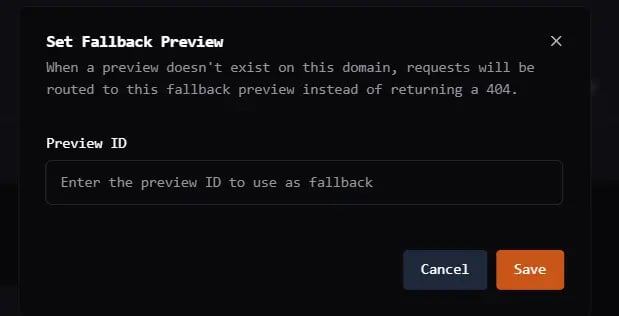
To configure a fallback preview from the console:
1. Go to **Workspace Settings** > **Custom Domains**
2. Click the **...** menu on the domain you want to configure
3. Select **Set Fallback Preview**
4. Enter the name of the preview to use as the catch-all
5. Click **Save**
To remove the fallback, open the same dialog and clear the preview name.
### Blaxel SDK
The Blaxel SDK requires two environment variables to authenticate:
| Variable | Description |
| -------------- | -------------------------- |
| `BL_WORKSPACE` | Your Blaxel workspace name |
| `BL_API_KEY` | Your Blaxel API key |
You can create an API key from the [Blaxel console](https://app.blaxel.ai/profile/security). Your workspace name is visible in the URL when you log in to the console (e.g. `app.blaxel.ai/{workspace}`).
Set them as environment variables or add them to a `.env` file at the root of your project:
```bash theme={null}
export BL_WORKSPACE=my-workspace
export BL_API_KEY=my-api-key
```
The Blaxel SDK does not accept credentials as constructor arguments. Credentials must come from environment variables, a `.env` file, or a local CLI login session (see below).
When developing locally, you can also **log in to your workspace with Blaxel CLI** (as shown above). This allows you to run Blaxel SDK functions that will automatically connect to your workspace without additional setup. When you deploy on Blaxel, authentication is handled automatically — no environment variables needed.
The recommended pattern for preview creation is `createIfNotExists()` / `create_if_not_exists()`. Blaxel first checks for an existing preview with the provided `name` and either returns it or creates a new one using your specified configuration.
Create and manage a sandbox’s public preview URL:
```typescript TypeScript theme={null}
import { SandboxInstance } from "@blaxel/core";
const sandbox = await SandboxInstance.get("my-sandbox");
// Create public preview
const preview = await sandbox.previews.createIfNotExists({
metadata: { name: "app-preview" },
spec: {
port: 3000,
public: true,
responseHeaders: {
"Access-Control-Allow-Origin": "https://YOUR-DOMAIN",
"Access-Control-Allow-Methods": "GET, POST, PUT, DELETE, OPTIONS, PATCH",
"Access-Control-Allow-Headers": "Content-Type, Authorization, X-Requested-With, X-Blaxel-Workspace, X-Blaxel-Preview-Token, X-Blaxel-Authorization",
"Access-Control-Allow-Credentials": "true",
"Access-Control-Expose-Headers": "Content-Length, X-Request-Id",
"Access-Control-Max-Age": "86400",
"Vary": "Origin"
}
}
});
// Get preview URL
const url = preview.spec?.url;
```
```python Python theme={null}
from blaxel.core import SandboxInstance
sandbox = await SandboxInstance.get("my-sandbox")
# Create public preview
preview = await sandbox.previews.create_if_not_exists({
"metadata": {"name": "app-preview"},
"spec": {
"port": 3000,
"public": True,
"responseHeaders": {
"Access-Control-Allow-Origin": "https://YOUR-DOMAIN",
"Access-Control-Allow-Methods": "GET, POST, PUT, DELETE, OPTIONS, PATCH",
"Access-Control-Allow-Headers": "Content-Type, Authorization, X-Requested-With, X-Blaxel-Workspace, X-Blaxel-Preview-Token, X-Blaxel-Authorization",
"Access-Control-Allow-Credentials": "true",
"Access-Control-Expose-Headers": "Content-Length, X-Request-Id",
"Access-Control-Max-Age": "86400",
"Vary": "Origin"
}
}
})
# Get preview URL
url = preview.spec.url
```
Or create a private preview:
```typescript TypeScript theme={null}
import { SandboxInstance } from "@blaxel/core";
const sandbox = await SandboxInstance.get("my-sandbox");
// Create private preview
const preview = await sandbox.previews.createIfNotExists({
metadata: { name: "private-preview" },
spec: {
port: 3000,
public: false
}
});
// Create access token (10 minutes expiry)
const expiresAt = new Date(Date.now() + 10 * 60 * 1000);
const token = await preview.tokens.create(expiresAt);
// How to access the preview with the token
const url = preview.spec?.url;
const response = await fetch(`${url}/health?bl_preview_token=${token.value}`);
```
```python Python theme={null}
import httpx
from blaxel.core import SandboxInstance
from datetime import datetime, timedelta, UTC
sandbox = await SandboxInstance.get("my-sandbox")
# Create private preview
preview = await sandbox.previews.create_if_not_exists({
"metadata": {"name": "private-preview"},
"spec": {
"port": 3000,
"public": False
}
})
# Create access token (10 minutes expiry)
expires_at = datetime.now(UTC) + timedelta(minutes=10)
token = await preview.tokens.create(expires_at)
# How to access the preview with the token
url = preview.spec.url
async with httpx.AsyncClient() as client:
response = await client.get(f"{url}/health?bl_preview_token={token.value}")
```
An alternative is to use `create()`, which raises an error when a preview with the specified name already exists:
```typescript TypeScript theme={null}
const preview = await sandbox.previews.create({
metadata: {
name: "preview-name"
},
spec: {
port: 443,
public: false
}
})
```
```python Python theme={null}
preview = await sandbox.previews.create({
"metadata": {
"name": "preview-name"
},
"spec": {
"port": 443,
"public": False
}
})
```
### URL prefix
You can customize the preview URL with a custom string prefix using the `prefixUrl` argument:
```typescript TypeScript theme={null}
const sandbox = await SandboxInstance.get("my-sandbox");
const preview = await sandbox.previews.createIfNotExists({
metadata: { name: "app-preview" },
spec: {
port: 3000,
public: true,
prefixUrl: "my-prefix"
}
});
```
```python Python theme={null}
sandbox = await SandboxInstance.get("my-sandbox")
preview = await sandbox.previews.create_if_not_exists({
"metadata": {"name": "app-preview"},
"spec": {
"port": 3000,
"public": True,
"prefixUrl": "my-prefix"
}
})
```
When using a prefix URL, the workspace name is automatically added to the prefix and included in the final structure for the preview URL - for example, `https://myprefix-workspace-xxx.preview.bl.run`.
## Custom domains
To set up a custom domain for your sandbox preview:
* Register a [custom domain](../Infrastructure/Custom-domains) to your Blaxel workspace and complete the verification process
* Use this verified custom domain when creating a new preview:
```typescript TypeScript {8} theme={null}
const preview = await sandbox.previews.createIfNotExists({
metadata: {
name: "preview-custom-domain"
},
spec: {
port: 443,
public: false,
customDomain: "your.custom.domain.dev"
}
})
```
```python Python {8} theme={null}
preview = await sandbox.previews.create_if_not_exists({
"metadata": {
"name": "preview-custom-domain"
},
"spec": {
"port": 443,
"public": True,
"customDomain": "your.custom.domain.dev"
}
})
```
When you register a custom domain, you also enable the use of wildcard subdomains for that domain. For example, if you register `mycompany.com`, you can configure preview URLs to use any `*.mycompany.com` subdomain.
### Fallback preview
You can also designate one preview as the fallback or catch-all for a custom domain. Any request to a subdomain that does not match an existing preview is routed to this fallback preview instead of returning a 404.
Common use cases for this include:
* Serving a branded "page not found" or landing page instead of a raw 404
* Routing all traffic to a primary preview by default
* Letting your application handle unknown subdomains with custom logic
To use a fallback preview, you must have:
* A [verified custom domain](#custom-domains) in your workspace
* At least one active preview on that custom domain
To configure a fallback preview from the console:
1. Go to **Workspace Settings** > **Custom Domains**
2. Click the **...** menu on the domain you want to configure
3. Select **Set Fallback Preview**
4. Enter the name of the preview to use as the catch-all
5. Click **Save**
To remove the fallback, open the same dialog and clear the preview name.
 To configure from the API, update the `fallbackPreviewId` field on the custom domain resource:
```bash Set fallback theme={null}
curl -X PUT "https://api.blaxel.ai/v0/customdomains/{domainName}" \
-H "Authorization: Bearer $BL_API_KEY" \
-H "X-Blaxel-Workspace: $BL_WORKSPACE" \
-H "Content-Type: application/json" \
-d '{
"metadata": {
"name": "yourdomain.com"
},
"spec": {
"fallbackPreviewId": "my-landing-page"
}
}'
```
```bash Remove fallback theme={null}
curl -X PUT "https://api.blaxel.ai/v0/customdomains/{domainName}" \
-H "Authorization: Bearer $BL_API_KEY" \
-H "X-Blaxel-Workspace: $BL_WORKSPACE" \
-H "Content-Type: application/json" \
-d '{
"metadata": {
"name": "yourdomain.com"
},
"spec": {
"fallbackPreviewId": ""
}
}'
```
When a request arrives for a subdomain on your custom domain:
1. Blaxel checks for a preview matching that subdomain.
2. If no match is found and a fallback is configured, the request is routed to the fallback preview.
3. If no fallback is configured, the request returns a 404.
The fallback only applies to requests on your custom domain. Standard Blaxel preview URLs (`*.preview.bl.run`) are not affected.
When a request is routed via fallback, Blaxel adds headers to the request so your application can customize its response:
| Header | Value | Description |
| --------------------------- | ------------ | -------------------------------------------------- |
| `X-Blaxel-Fallback` | `true` | Indicates the request was routed via fallback |
| `X-Blaxel-Fallback-Preview` | Preview name | The subdomain or preview name originally requested |
| `X-Blaxel-Fallback-Domain` | Domain name | The base custom domain (e.g. `yourdomain.com`) |
Use `X-Blaxel-Fallback-Preview` to display a contextual message such as "Preview \[name] was not found" on your fallback page.
Security considerations:
* The fallback preview must belong to the same workspace as the custom domain; cross-workspace fallbacks are not allowed.
* Client-injected `X-Blaxel-Fallback-*` headers are stripped before routing, so only Blaxel-set values are forwarded.
* If the fallback lookup fails for any reason, the request falls through to normal routing without blocking traffic.
For example, suppose you have a custom domain `demo-previews.store` with two previews:
| Preview name | URL |
| -------------- | ---------------------------------- |
| `my-app` | `my-app.demo-previews.store` |
| `landing-page` | `landing-page.demo-previews.store` |
With `landing-page` set as the fallback, requests are routed as follows:
* `my-app.demo-previews.store` routes to the `my-app` preview (direct match)
* `landing-page.demo-previews.store` routes to the `landing-page` preview (direct match)
* `unknown.demo-previews.store` routes to the `landing-page` preview (fallback)
On fallback requests, your `landing-page` application receives `X-Blaxel-Fallback: true` and `X-Blaxel-Fallback-Preview: unknown`, allowing it to show a contextual error page.
## Delete a preview
When a sandbox is deleted, whether manually or automatically due to a TTL or expiration policy, all of its associated preview URLs are automatically cleaned up as part of that deletion.
If you need to remove a preview URL before a sandbox is deleted, you can do so explicitly using the SDKs.
```typescript TypeScript theme={null}
const sandbox = await SandboxInstance.get("my-sandbox");
await sandbox.previews.delete("app-preview");
```
```python Python theme={null}
sandbox = await SandboxInstance.get("my-sandbox")
await sandbox.previews.delete("app-preview")
```
## FAQ
**What is a fallback preview for a custom domain?**
A fallback preview is a designated preview that receives requests for unrecognized subdomains on your custom domain, instead of returning a 404 error.
**When does Blaxel route traffic to the fallback preview?**
Blaxel routes to the fallback when a request arrives for a subdomain that does not match any existing preview on that custom domain. If no fallback is configured, the request returns a 404.
**How do I configure a fallback preview from the console?**
In the Blaxel Console, go to **Workspace Settings** > **Custom Domains**, click the **...** menu on the domain, select **Set Fallback Preview**, enter the preview name, and click **Save**.
**What headers does my application receive on a fallback request?**
Blaxel adds `X-Blaxel-Fallback: true`, `X-Blaxel-Fallback-Preview` (the subdomain that was requested), and `X-Blaxel-Fallback-Domain` (the base custom domain) to all fallback requests.
**How do I remove a fallback preview?**
From the console, open the Configure Fallback dialog and clear the preview name. From the API, send a PUT request with `fallbackPreviewId` set to an empty string.
Register and verify a custom domain for your Blaxel workspace.
Configure TTL and auto-deletion rules for sandboxes.
To configure from the API, update the `fallbackPreviewId` field on the custom domain resource:
```bash Set fallback theme={null}
curl -X PUT "https://api.blaxel.ai/v0/customdomains/{domainName}" \
-H "Authorization: Bearer $BL_API_KEY" \
-H "X-Blaxel-Workspace: $BL_WORKSPACE" \
-H "Content-Type: application/json" \
-d '{
"metadata": {
"name": "yourdomain.com"
},
"spec": {
"fallbackPreviewId": "my-landing-page"
}
}'
```
```bash Remove fallback theme={null}
curl -X PUT "https://api.blaxel.ai/v0/customdomains/{domainName}" \
-H "Authorization: Bearer $BL_API_KEY" \
-H "X-Blaxel-Workspace: $BL_WORKSPACE" \
-H "Content-Type: application/json" \
-d '{
"metadata": {
"name": "yourdomain.com"
},
"spec": {
"fallbackPreviewId": ""
}
}'
```
When a request arrives for a subdomain on your custom domain:
1. Blaxel checks for a preview matching that subdomain.
2. If no match is found and a fallback is configured, the request is routed to the fallback preview.
3. If no fallback is configured, the request returns a 404.
The fallback only applies to requests on your custom domain. Standard Blaxel preview URLs (`*.preview.bl.run`) are not affected.
When a request is routed via fallback, Blaxel adds headers to the request so your application can customize its response:
| Header | Value | Description |
| --------------------------- | ------------ | -------------------------------------------------- |
| `X-Blaxel-Fallback` | `true` | Indicates the request was routed via fallback |
| `X-Blaxel-Fallback-Preview` | Preview name | The subdomain or preview name originally requested |
| `X-Blaxel-Fallback-Domain` | Domain name | The base custom domain (e.g. `yourdomain.com`) |
Use `X-Blaxel-Fallback-Preview` to display a contextual message such as "Preview \[name] was not found" on your fallback page.
Security considerations:
* The fallback preview must belong to the same workspace as the custom domain; cross-workspace fallbacks are not allowed.
* Client-injected `X-Blaxel-Fallback-*` headers are stripped before routing, so only Blaxel-set values are forwarded.
* If the fallback lookup fails for any reason, the request falls through to normal routing without blocking traffic.
For example, suppose you have a custom domain `demo-previews.store` with two previews:
| Preview name | URL |
| -------------- | ---------------------------------- |
| `my-app` | `my-app.demo-previews.store` |
| `landing-page` | `landing-page.demo-previews.store` |
With `landing-page` set as the fallback, requests are routed as follows:
* `my-app.demo-previews.store` routes to the `my-app` preview (direct match)
* `landing-page.demo-previews.store` routes to the `landing-page` preview (direct match)
* `unknown.demo-previews.store` routes to the `landing-page` preview (fallback)
On fallback requests, your `landing-page` application receives `X-Blaxel-Fallback: true` and `X-Blaxel-Fallback-Preview: unknown`, allowing it to show a contextual error page.
## Delete a preview
When a sandbox is deleted, whether manually or automatically due to a TTL or expiration policy, all of its associated preview URLs are automatically cleaned up as part of that deletion.
If you need to remove a preview URL before a sandbox is deleted, you can do so explicitly using the SDKs.
```typescript TypeScript theme={null}
const sandbox = await SandboxInstance.get("my-sandbox");
await sandbox.previews.delete("app-preview");
```
```python Python theme={null}
sandbox = await SandboxInstance.get("my-sandbox")
await sandbox.previews.delete("app-preview")
```
## FAQ
**What is a fallback preview for a custom domain?**
A fallback preview is a designated preview that receives requests for unrecognized subdomains on your custom domain, instead of returning a 404 error.
**When does Blaxel route traffic to the fallback preview?**
Blaxel routes to the fallback when a request arrives for a subdomain that does not match any existing preview on that custom domain. If no fallback is configured, the request returns a 404.
**How do I configure a fallback preview from the console?**
In the Blaxel Console, go to **Workspace Settings** > **Custom Domains**, click the **...** menu on the domain, select **Set Fallback Preview**, enter the preview name, and click **Save**.
**What headers does my application receive on a fallback request?**
Blaxel adds `X-Blaxel-Fallback: true`, `X-Blaxel-Fallback-Preview` (the subdomain that was requested), and `X-Blaxel-Fallback-Domain` (the base custom domain) to all fallback requests.
**How do I remove a fallback preview?**
From the console, open the Configure Fallback dialog and clear the preview name. From the API, send a PUT request with `fallbackPreviewId` set to an empty string.
Register and verify a custom domain for your Blaxel workspace.
Configure TTL and auto-deletion rules for sandboxes.