> ## Documentation Index
> Fetch the complete documentation index at: https://docs.blaxel.ai/llms.txt
> Use this file to discover all available pages before exploring further.
# Run coding agents in Blaxel sandboxes from Herdr
> Use the Herdr Blaxel plugin to run a coding agent in a persistent sandbox, reconnect, preview an application, and apply reviewed changes locally.
Use [Herdr](https://herdr.dev) to run a coding agent in a persistent Blaxel sandbox while your Git worktree stays on your computer. In this tutorial, you update an invoice summary, reconnect to the agent, open a private preview, and bring the changes back to your local files.
## Prerequisites
* A [Blaxel account](https://app.blaxel.ai) and workspace with permission to create sandboxes
* [Herdr](https://herdr.dev/docs/) `0.8.0` or newer on macOS or Linux
* [Node.js](https://nodejs.org/en/download) `22` or newer, with npm and Git available locally
* The [Blaxel CLI](/cli-reference/introduction#install) installed locally; this walkthrough is verified with `0.1.110`
* Access to Codex through an account or an `OPENAI_API_KEY` for the agent running inside the sandbox
This walkthrough uses Codex. The plugin also supports Claude Code, OpenCode, and Pi. It installs the selected coding tool inside the sandbox; you do not need the tool installed locally or credentials in the invoice application.
## 1. Install the plugin and connect to Blaxel
Log in to Blaxel and check your active workspace:
```bash theme={null}
bl login
bl workspaces --current
```
Install the plugin:
```bash theme={null}
herdr plugin install blaxel-ai/herdr-blaxel-sandbox-plugin
herdr plugin list
herdr plugin action list --plugin blaxel.sandbox
```
Confirm that Blaxel Sandbox appears, with actions for Start, reconnect, applying changes, previews, and the dashboard.
## 2. Configure the agent and previews
Open the dashboard and press `t` to choose Codex, Claude Code, OpenCode, or Pi. Press `w` to choose the workspace for new sandboxes. Existing sandboxes keep their original tool and workspace.
```bash theme={null}
herdr plugin action invoke dashboard --plugin blaxel.sandbox
```
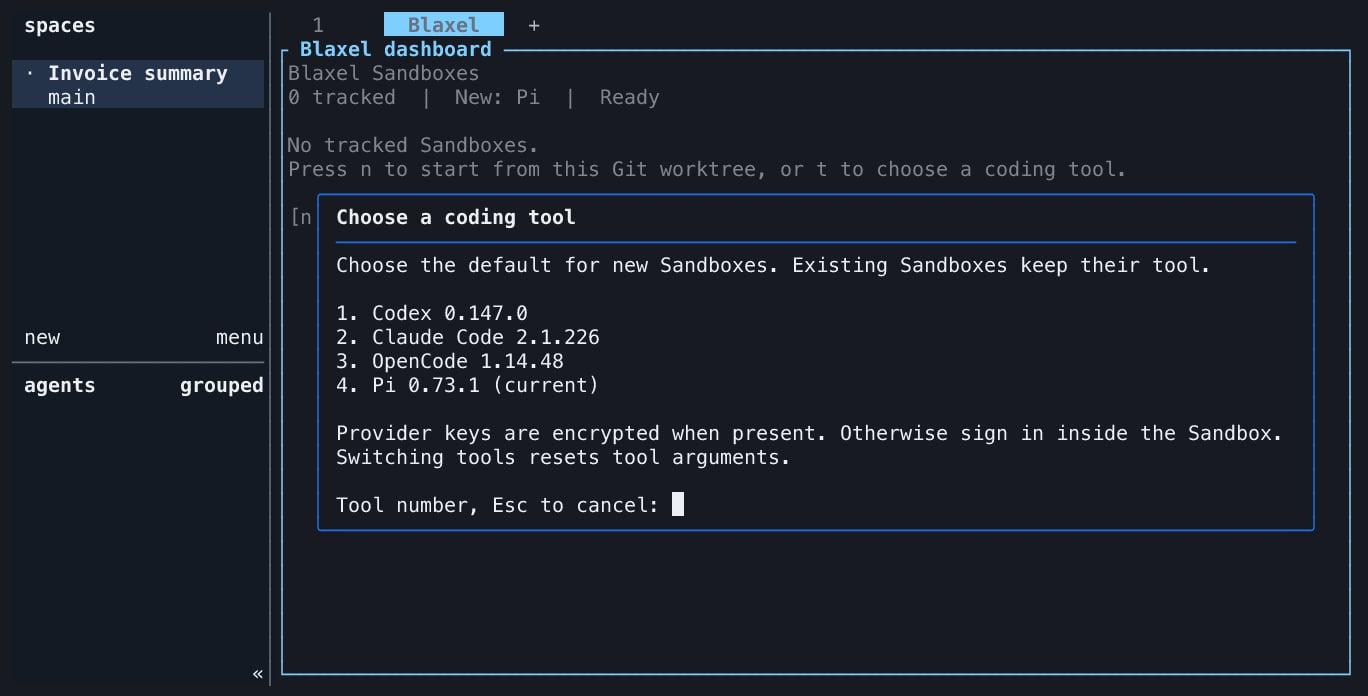 For this Codex walkthrough, find the plugin's configuration directory:
```bash theme={null}
herdr plugin config-dir blaxel.sandbox
```
Create or edit `config.json` in that directory. Keep any existing settings you need and set:
```json theme={null}
{
"agent": "codex",
"previewPorts": [3000],
"publicPreviews": false
}
```
The plugin uses your current Blaxel CLI workspace, a `blaxel/ts-app:latest` sandbox with `4096` MB of memory, and a seven-day idle deletion policy by default. Set `workspace` to a workspace name if you need a fixed target for new sandboxes. Existing mappings keep the workspace they were created in.
For agent authentication, complete the Codex login inside the sandbox when prompted. If `OPENAI_API_KEY` is already available to the Herdr process, the plugin passes it as an encrypted sandbox secret and signs Codex in with it. It does not copy local coding-agent sessions or credential files.
Keep credentials out of `config.json` and `agentArgs`. The [configuration reference](https://github.com/blaxel-ai/herdr-blaxel-sandbox-plugin/blob/main/docs/configuration.md) also covers Claude Code, OpenCode, Pi, regions, upload limits, and expiration settings.
## 3. Prepare the invoice project
Clone the plugin repository to get its runnable example, then copy only the example into a fresh Git worktree:
```bash theme={null}
git clone https://github.com/blaxel-ai/herdr-blaxel-sandbox-plugin.git
example_dir="$(mktemp -d "${TMPDIR:-/tmp}/herdr-invoice-summary.XXXXXX")"
cp -R herdr-blaxel-sandbox-plugin/examples/invoice-summary/. "$example_dir/"
cd "$example_dir"
git init
git add .
git -c user.name="Herdr Example" -c user.email="example@localhost" commit -m "Invoice summary baseline"
npm test
npm start
```
The example has no dependencies to install. Its three tests pass, and the initial summary is:
```json theme={null}
{
"count": 3,
"totalCents": 439550,
"paidCents": 125000,
"openCents": 314550
}
```
Open the directory printed by `pwd` as a workspace in Herdr. Use a local shell pane in that workspace for the plugin commands below.
## 4. Start an agent in Blaxel
Run Start from the invoice project's local Herdr pane:
```bash theme={null}
herdr plugin action invoke start-agent --plugin blaxel.sandbox
```
Start displays the target and filtered upload manifest, creates a sandbox, uploads the eligible files, installs the configured agent, and opens a Blaxel agent pane. The plugin excludes Git-ignored files, `.git`, dependencies, environment files, common credentials, and recognized secrets from the upload.
Each Start creates an independent sandbox, including repeated Starts from the same pane. To return to an existing sandbox, use Connect in the dashboard.
Open the dashboard from a local Herdr shell:
```bash theme={null}
herdr plugin action invoke dashboard --plugin blaxel.sandbox
```
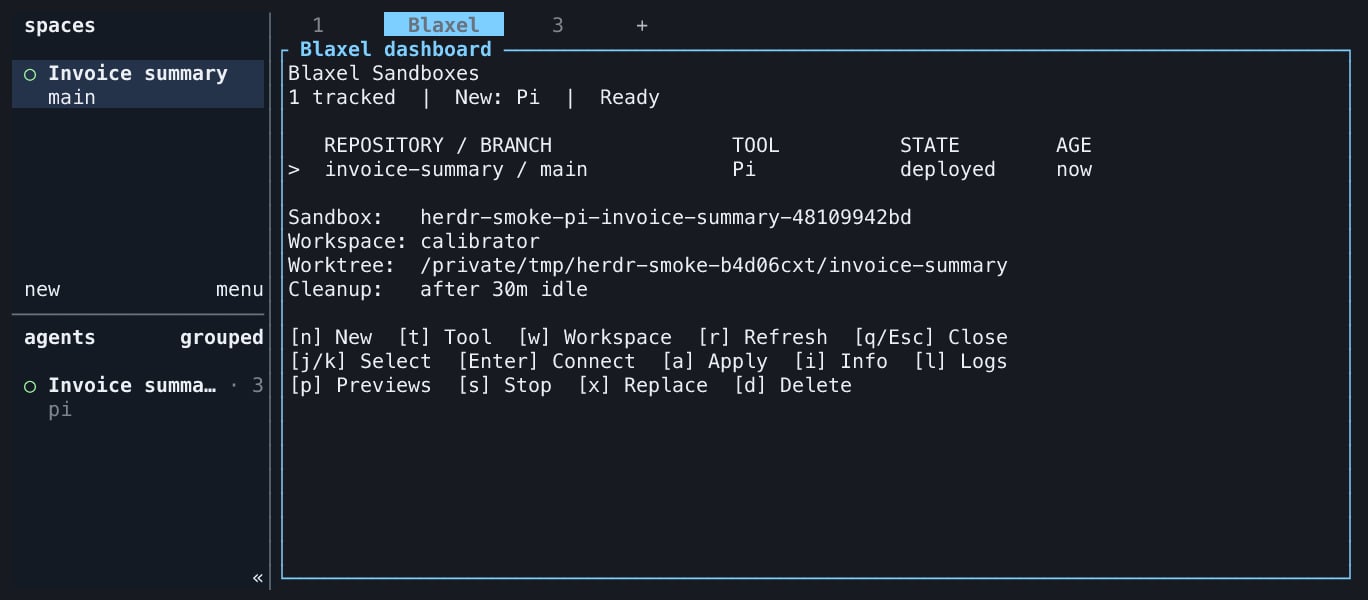
Select the invoice project's sandbox. Check its workspace, agent, and state. Press `Enter` or `c` to connect to its agent pane.
For this Codex walkthrough, find the plugin's configuration directory:
```bash theme={null}
herdr plugin config-dir blaxel.sandbox
```
Create or edit `config.json` in that directory. Keep any existing settings you need and set:
```json theme={null}
{
"agent": "codex",
"previewPorts": [3000],
"publicPreviews": false
}
```
The plugin uses your current Blaxel CLI workspace, a `blaxel/ts-app:latest` sandbox with `4096` MB of memory, and a seven-day idle deletion policy by default. Set `workspace` to a workspace name if you need a fixed target for new sandboxes. Existing mappings keep the workspace they were created in.
For agent authentication, complete the Codex login inside the sandbox when prompted. If `OPENAI_API_KEY` is already available to the Herdr process, the plugin passes it as an encrypted sandbox secret and signs Codex in with it. It does not copy local coding-agent sessions or credential files.
Keep credentials out of `config.json` and `agentArgs`. The [configuration reference](https://github.com/blaxel-ai/herdr-blaxel-sandbox-plugin/blob/main/docs/configuration.md) also covers Claude Code, OpenCode, Pi, regions, upload limits, and expiration settings.
## 3. Prepare the invoice project
Clone the plugin repository to get its runnable example, then copy only the example into a fresh Git worktree:
```bash theme={null}
git clone https://github.com/blaxel-ai/herdr-blaxel-sandbox-plugin.git
example_dir="$(mktemp -d "${TMPDIR:-/tmp}/herdr-invoice-summary.XXXXXX")"
cp -R herdr-blaxel-sandbox-plugin/examples/invoice-summary/. "$example_dir/"
cd "$example_dir"
git init
git add .
git -c user.name="Herdr Example" -c user.email="example@localhost" commit -m "Invoice summary baseline"
npm test
npm start
```
The example has no dependencies to install. Its three tests pass, and the initial summary is:
```json theme={null}
{
"count": 3,
"totalCents": 439550,
"paidCents": 125000,
"openCents": 314550
}
```
Open the directory printed by `pwd` as a workspace in Herdr. Use a local shell pane in that workspace for the plugin commands below.
## 4. Start an agent in Blaxel
Run Start from the invoice project's local Herdr pane:
```bash theme={null}
herdr plugin action invoke start-agent --plugin blaxel.sandbox
```
Start displays the target and filtered upload manifest, creates a sandbox, uploads the eligible files, installs the configured agent, and opens a Blaxel agent pane. The plugin excludes Git-ignored files, `.git`, dependencies, environment files, common credentials, and recognized secrets from the upload.
Each Start creates an independent sandbox, including repeated Starts from the same pane. To return to an existing sandbox, use Connect in the dashboard.
Open the dashboard from a local Herdr shell:
```bash theme={null}
herdr plugin action invoke dashboard --plugin blaxel.sandbox
```
Select the invoice project's sandbox. Check its workspace, agent, and state. Press `Enter` or `c` to connect to its agent pane.
 ## 5. Update and test the invoice summary
Give the remote agent this task:
```text theme={null}
Add an overdueCents field to summarize(rows, asOf), using an explicit YYYY-MM-DD cutoff date. An invoice is overdue only when it is open and its due date is earlier than asOf. For 2026-09-08, the sample ledger should report 84550 overdue cents. Keep the existing totals unchanged. Update the CLI to use that cutoff date. Add tests for paid invoices, invoices due on the cutoff date, and an empty ledger. Run npm test and npm start, then show git diff.
```
Check the command output from the agent. The summary should include `overdueCents: 84550`, and all tests should pass. The edits remain in the sandbox until you approve applying them locally.
## 6. Reconnect to the same session
Close the Blaxel agent pane. Open the dashboard again from a local Herdr shell:
```bash theme={null}
herdr plugin action invoke dashboard --plugin blaxel.sandbox
```
Select the same sandbox and press `Enter` or `c`. The plugin reattaches to its persistent remote `tmux` session. Ask the agent to run `npm test` again and confirm that its changes are still present.
The dashboard selects the exact sandbox even when the project has several agents. Local `herdr` commands run in your local shell pane; the agent pane runs inside the sandbox.
## 7. Open a private application preview
The invoice example starts as a command-line program. To view its result through a browser, ask the remote agent to create `server.mjs` with this content:
```javascript theme={null}
import { createServer } from 'node:http';
import { invoices, summarize } from './invoices.mjs';
createServer((request, response) => {
if (request.method !== 'GET' || request.url !== '/') {
response.writeHead(404).end('Not found');
return;
}
response.writeHead(200, {
'Content-Type': 'application/json; charset=utf-8',
'Cache-Control': 'no-store',
});
response.end(JSON.stringify(summarize(invoices, '2026-09-08'), null, 2));
}).listen(3000, '0.0.0.0');
```
Ask the agent to start `node server.mjs`, keep it running, and verify `http://127.0.0.1:3000/` from inside the sandbox. The server must listen on `0.0.0.0` for Blaxel to route preview traffic to it.
If Codex requests permission to bind the port or make a local HTTP request, review and approve that command in the remote agent pane.
In the local Herdr dashboard, select the same sandbox and press `p` for Previews. Open the temporary URL shown for port `3000`. Your browser should display the JSON summary, including the overdue balance.
Keep `publicPreviews` set to `false`. The plugin generates a private preview token valid for ten minutes; reopen Previews to obtain a new link when it expires. Treat that temporary URL as a credential.
## 8. Review and apply the changes locally
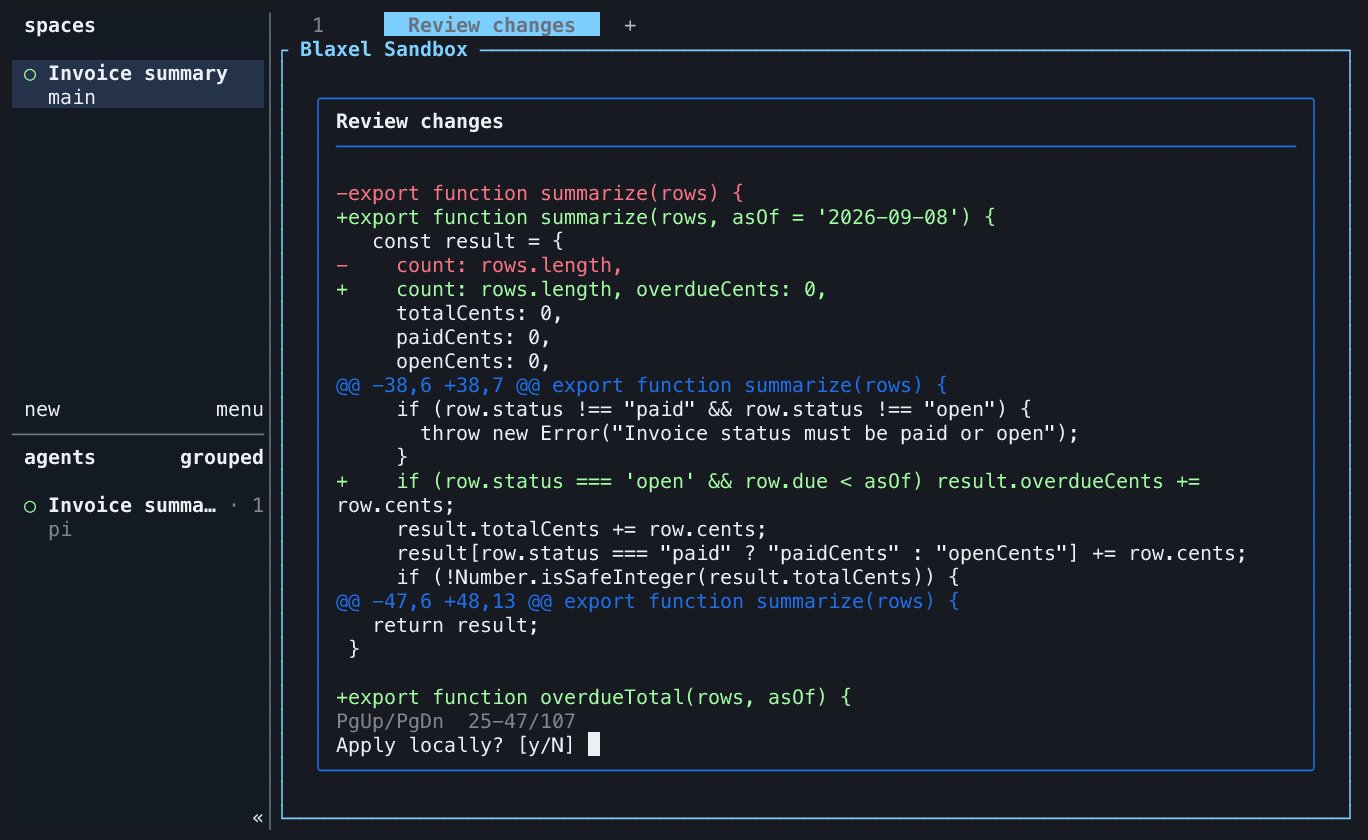
Ask the agent to show `git diff` and finish any file edits before applying. In the local dashboard, select the sandbox and press `a` for Apply.
The plugin exports the remote changes against the upload baseline, checks the patch against your current local files, and shows the complete patch with colored additions and deletions. Use Page Up and Page Down to review it, then answer `y` to apply or press Escape to cancel. Exports larger than 1 MiB are refused before download or local changes; reduce the remote changes before retrying.
## 5. Update and test the invoice summary
Give the remote agent this task:
```text theme={null}
Add an overdueCents field to summarize(rows, asOf), using an explicit YYYY-MM-DD cutoff date. An invoice is overdue only when it is open and its due date is earlier than asOf. For 2026-09-08, the sample ledger should report 84550 overdue cents. Keep the existing totals unchanged. Update the CLI to use that cutoff date. Add tests for paid invoices, invoices due on the cutoff date, and an empty ledger. Run npm test and npm start, then show git diff.
```
Check the command output from the agent. The summary should include `overdueCents: 84550`, and all tests should pass. The edits remain in the sandbox until you approve applying them locally.
## 6. Reconnect to the same session
Close the Blaxel agent pane. Open the dashboard again from a local Herdr shell:
```bash theme={null}
herdr plugin action invoke dashboard --plugin blaxel.sandbox
```
Select the same sandbox and press `Enter` or `c`. The plugin reattaches to its persistent remote `tmux` session. Ask the agent to run `npm test` again and confirm that its changes are still present.
The dashboard selects the exact sandbox even when the project has several agents. Local `herdr` commands run in your local shell pane; the agent pane runs inside the sandbox.
## 7. Open a private application preview
The invoice example starts as a command-line program. To view its result through a browser, ask the remote agent to create `server.mjs` with this content:
```javascript theme={null}
import { createServer } from 'node:http';
import { invoices, summarize } from './invoices.mjs';
createServer((request, response) => {
if (request.method !== 'GET' || request.url !== '/') {
response.writeHead(404).end('Not found');
return;
}
response.writeHead(200, {
'Content-Type': 'application/json; charset=utf-8',
'Cache-Control': 'no-store',
});
response.end(JSON.stringify(summarize(invoices, '2026-09-08'), null, 2));
}).listen(3000, '0.0.0.0');
```
Ask the agent to start `node server.mjs`, keep it running, and verify `http://127.0.0.1:3000/` from inside the sandbox. The server must listen on `0.0.0.0` for Blaxel to route preview traffic to it.
If Codex requests permission to bind the port or make a local HTTP request, review and approve that command in the remote agent pane.
In the local Herdr dashboard, select the same sandbox and press `p` for Previews. Open the temporary URL shown for port `3000`. Your browser should display the JSON summary, including the overdue balance.
Keep `publicPreviews` set to `false`. The plugin generates a private preview token valid for ten minutes; reopen Previews to obtain a new link when it expires. Treat that temporary URL as a credential.
## 8. Review and apply the changes locally
Ask the agent to show `git diff` and finish any file edits before applying. In the local dashboard, select the sandbox and press `a` for Apply.
The plugin exports the remote changes against the upload baseline, checks the patch against your current local files, and shows the complete patch with colored additions and deletions. Use Page Up and Page Down to review it, then answer `y` to apply or press Escape to cancel. Exports larger than 1 MiB are refused before download or local changes; reduce the remote changes before retrying.
 Back in the local invoice project, verify the result:
```bash theme={null}
git diff
npm test
npm start
```
Confirm that `overdueCents` is `84550`, the tests pass, and `server.mjs` is present. If a local change conflicts with the remote patch, the plugin applies nothing. Resolve or stash the conflicting local edits, then retry Apply.
## 9. Delete the sandbox
After verifying the local changes, select the example's sandbox in the dashboard and press `d` for Delete. Check the sandbox name in the confirmation and type `DELETE` to permanently remove it.
Refresh the dashboard and confirm that the mapping is gone. If you started more than one sandbox for the exercise, delete each one you no longer need.
Stop ends the agent session and preserves sandbox files. Delete permanently removes the sandbox and its remote files. Apply and verify any changes you want to keep before deleting it.
## Troubleshooting
| Symptom | Action |
| -------------------------------------------------- | ----------------------------------------------------------------------------------------------------------------------------------------------- |
| Blaxel Sandbox is missing from Herdr | Check `herdr --version`, reinstall the plugin, and run `herdr plugin list` |
| Start cannot resolve a Blaxel workspace | Run `bl login` and `bl workspaces --current` in your local shell; check any configured `workspace` value |
| Start reports that the snapshot changed | Return to the intended local project pane and rerun Start after file edits have stopped |
| The agent asks for authentication | Complete login inside the sandbox; local coding-agent credentials are not copied |
| The terminal fails with `websocket: bad handshake` | With CLI `0.1.110`, run `bl login ` for the workspace selected in the plugin, then reconnect; this updates the CLI current workspace |
| Reconnect reports a missing sandbox | Check whether it expired or was deleted; Start creates a new sandbox from your current local files |
| Port 3000 has no preview or the link expired | Keep the server running on `0.0.0.0:3000`, check `previewPorts`, and reopen Previews for a fresh link |
| Apply reports a conflict | Resolve or stash conflicting local edits, then retry; do not force-apply the exported patch |
## Resources
Read the plugin reference and run the invoice summary example.
Learn how preview URLs and access tokens connect your browser to a sandbox application.
Configure lifetime and idle deletion policies for your sandboxes.
Back in the local invoice project, verify the result:
```bash theme={null}
git diff
npm test
npm start
```
Confirm that `overdueCents` is `84550`, the tests pass, and `server.mjs` is present. If a local change conflicts with the remote patch, the plugin applies nothing. Resolve or stash the conflicting local edits, then retry Apply.
## 9. Delete the sandbox
After verifying the local changes, select the example's sandbox in the dashboard and press `d` for Delete. Check the sandbox name in the confirmation and type `DELETE` to permanently remove it.
Refresh the dashboard and confirm that the mapping is gone. If you started more than one sandbox for the exercise, delete each one you no longer need.
Stop ends the agent session and preserves sandbox files. Delete permanently removes the sandbox and its remote files. Apply and verify any changes you want to keep before deleting it.
## Troubleshooting
| Symptom | Action |
| -------------------------------------------------- | ----------------------------------------------------------------------------------------------------------------------------------------------- |
| Blaxel Sandbox is missing from Herdr | Check `herdr --version`, reinstall the plugin, and run `herdr plugin list` |
| Start cannot resolve a Blaxel workspace | Run `bl login` and `bl workspaces --current` in your local shell; check any configured `workspace` value |
| Start reports that the snapshot changed | Return to the intended local project pane and rerun Start after file edits have stopped |
| The agent asks for authentication | Complete login inside the sandbox; local coding-agent credentials are not copied |
| The terminal fails with `websocket: bad handshake` | With CLI `0.1.110`, run `bl login ` for the workspace selected in the plugin, then reconnect; this updates the CLI current workspace |
| Reconnect reports a missing sandbox | Check whether it expired or was deleted; Start creates a new sandbox from your current local files |
| Port 3000 has no preview or the link expired | Keep the server running on `0.0.0.0:3000`, check `previewPorts`, and reopen Previews for a fresh link |
| Apply reports a conflict | Resolve or stash conflicting local edits, then retry; do not force-apply the exported patch |
## Resources
Read the plugin reference and run the invoice summary example.
Learn how preview URLs and access tokens connect your browser to a sandbox application.
Configure lifetime and idle deletion policies for your sandboxes.