Use Blaxel service accounts with non-user API credentials to automate the full life-cycle of resources in CI/CD pipelines and backend systems.
Service accounts are workspace users (i.e. identities) that represent an external system that needs to access Blaxel to operate resources in one specific workspace.
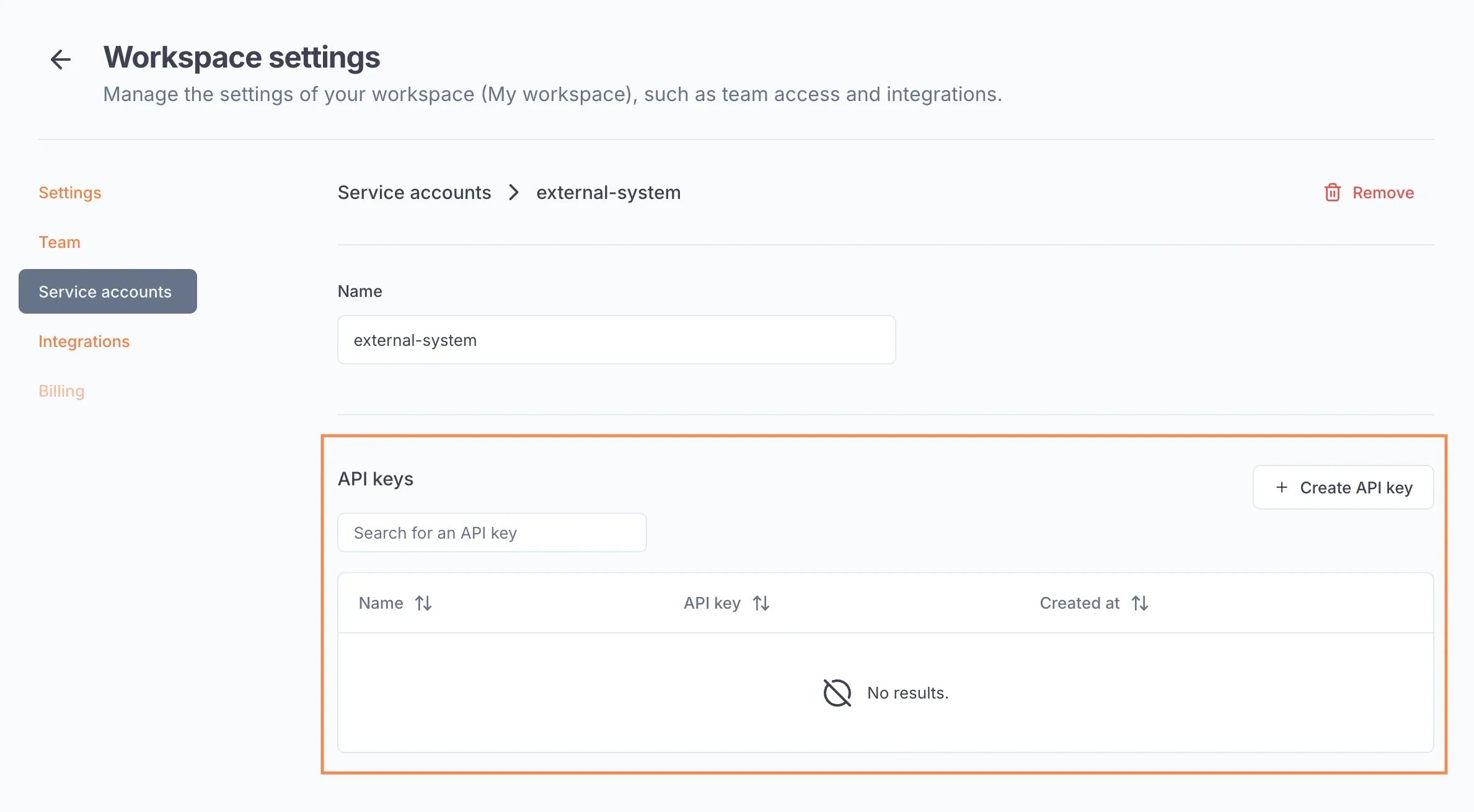
Service accounts can use API keys to authenticate on Blaxel. These API keys can be created and managed by admins from the service account’s page, in your workspace settings.API keys can have an infinite validity duration.
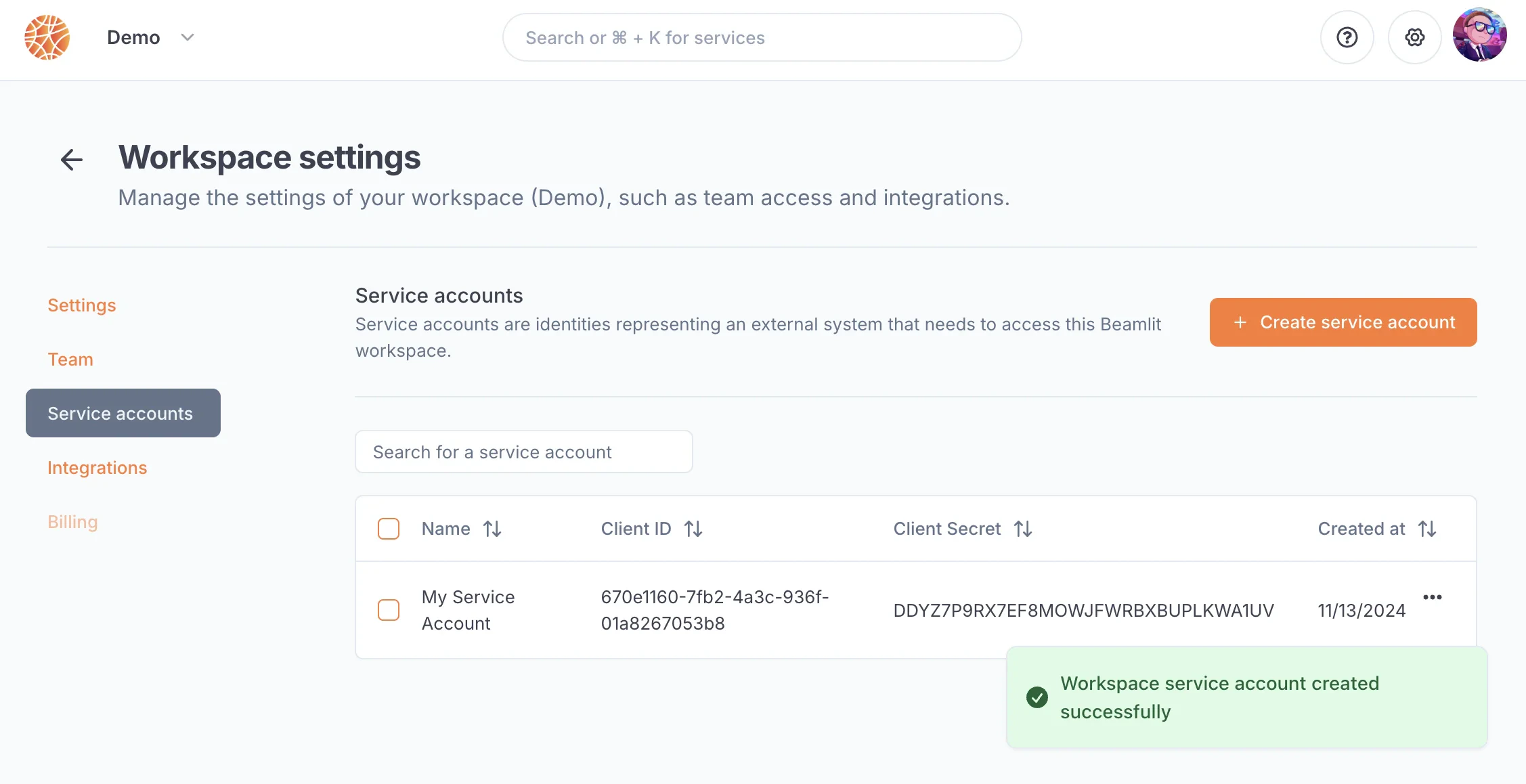
Service accounts can also use the client credentialsOAuth 2.0 grant type, via their client ID and client secret. A pair of client ID / client secret is generated automatically by Blaxel when you create a new service account.
Make sure to copy the client secret when you create the service account as you will never be able to access it again after you leave the page.
Service accounts have a role in the workspace, like other users from your team: admin, member or viewer. API keys and client credentials of a service account act with the permissions of its role.The role is set when the service account is created (admin by default):
from Workspace settings > Service accounts, when creating a service account
from Create workspace API key, which creates a service account and its API key in one step
Admins can change the role of a service account from its page in the workspace settings.With the Blaxel API, set role to admin, member or viewer when creating (POST /service_accounts) or updating (PUT /service_accounts/{clientId}) a service account. When role is omitted on update, the role stays the same.
Last modified on October 10, 2026
Was this page helpful?
{"docsConfig":{"theme":"mint","$schema":"https://mintlify.com/docs.json","name":"Documentation","description":"Blaxel documentation: cloud sandboxes, AI agent hosting, MCP servers, batch jobs, and model gateway for building and deploying AI-powered applications.","colors":{"primary":"#F0652D","light":"#FD7B35","dark":"#F0652D"},"logo":{"light":"https://mintcdn.com/blaxel/Z-RIT2VoXMT2Aw7L/images/logo-light.svg?fit=max\u0026auto=format\u0026n=Z-RIT2VoXMT2Aw7L\u0026q=85\u0026s=7a7cf1e3c766c77f97f32e5c0d4fd209","dark":"https://mintcdn.com/blaxel/Z-RIT2VoXMT2Aw7L/images/logo-dark.svg?fit=max\u0026auto=format\u0026n=Z-RIT2VoXMT2Aw7L\u0026q=85\u0026s=17297eca3e92fe15a91eed262f17d659"},"favicon":"https://mintcdn.com/blaxel/nH6Nd4qmP2OsLhOO/favicon.svg?fit=max\u0026auto=format\u0026n=nH6Nd4qmP2OsLhOO\u0026q=85\u0026s=484b8f0ebe3fb56aef259d514eeaa18c","appearance":{"default":"system"},"background":{"color":{"dark":"#09090B"}},"navbar":{"links":[{"icon":"calendar","href":"/changelog","label":"Changelog"},{"icon":"robot","href":"/skills-mcp","label":"Agent Skill"},{"icon":"puzzle-piece","href":"https://blaxel.ai/integrations","label":"Integrations"},{"icon":"discord","href":"/Community","label":"Community"}],"primary":{"type":"button","label":"Blaxel Console","href":"https://app.blaxel.ai"}},"footer":{"socials":{"github":"https://github.com/blaxel-ai","linkedin":"https://www.linkedin.com/company/blaxel-ai","twitter":"https://x.com/blaxelai","discord":"https://discord.gg/CsWKUZUHFQ"}},"search":{"prompt":"Search Blaxel docs..."},"seo":{"metatags":{"og:type":"website","og:site_name":"Blaxel Documentation"},"indexing":"navigable"},"fonts":{"family":"Inter"},"integrations":{"posthog":{"apiKey":"phc_HGJ7t7Qa8cJJilL0CONU5se4vM6jU6nKFCuoCC9LSha","apiHost":"https://events.blaxel.ai"}},"banner":{"content":"Blaxel has joined Baseten to build the future of agentic infrastructure! [Read our announcement.](https://www.baseten.co/blog/blaxel-is-joining-baseten-to-build-the-future-of-agentic-cloud/)","dismissible":true},"contextual":{"options":["copy","view","chatgpt","claude","cursor","devin","download-spec"],"display":"header"},"metadata":{"timestamp":true},"styling":{"latex":false},"navigation":{"global":{"anchors":[{"anchor":"Changelog","icon":"calendar","href":"/changelog"},{"anchor":"Blaxel Skills \u0026 MCP","icon":"robot","href":"/skills-mcp"},{"anchor":"Integrations directory","icon":"puzzle-piece","href":"https://blaxel.ai/integrations"},{"anchor":"Community","icon":"discord","href":"/Community"}]},"pages":[]}},"deployment":{"deploymentMetadataValue":{"subdomain":"blaxel","hasAudioNarration":false,"actualSubdomain":"blaxel","customDomains":["docs.blaxel.ai"],"gitSource":{"type":"github","owner":"blaxel-ai","repo":"docs","deployBranch":"main","contentDirectory":"","isPrivate":true,"mountPath":"","label":""},"feedback":{"thumbs":true,"issues":true,"edits":true},"entitlements":{"AI_CHAT":{"status":"ENABLED"},"WEB_MCP":{"status":"ENABLED"},"NARRATION":{"status":"ENABLED"}},"buildId":"6af5fcb3dee269cf351393e1","clientVersion":"0.0.4117","searchFilterCounts":[{"language":"default","tag":"Platform APIs Reference","count":180},{"language":"default","tag":"Management API","count":177},{"language":"default","tag":"Documentation","count":115},{"language":"default","tag":"Overview","count":75},{"language":"default","tag":"CLI Reference","count":73},{"language":"default","tag":"Commands","count":72},{"language":"default","tag":"Sandbox API Reference","count":46},{"language":"default","tag":"Troubleshooting","count":41},{"language":"default","tag":"Tutorials and Examples","count":35},{"language":"default","tag":"compute","count":35}]},"assistantConfig":{"enableStarterQuestions":true,"enableContextualStarterQuestions":true,"deflection":{"enabled":true,"email":"support@blaxel.ai","showHelpButton":true}},"basePath":"","hasChatPermissions":true,"hasWebMcpPermissions":true,"toggles":[{"name":"kill-isr","enabled":true,"variant":{"name":"disabled","enabled":false,"feature_enabled":true},"impressionData":false},{"name":"custom-rbac-roles","enabled":true,"variant":{"name":"disabled","enabled":false,"feature_enabled":true},"impressionData":false},{"name":"agent-mintlify-slack","enabled":true,"variant":{"name":"disabled","enabled":false,"feature_enabled":true},"impressionData":false},{"name":"agent-integrations-settings","enabled":true,"variant":{"name":"disabled","enabled":false,"feature_enabled":true},"impressionData":false},{"name":"rbac-expansion","enabled":true,"variant":{"name":"disabled","enabled":false,"feature_enabled":true},"impressionData":false},{"name":"automations-pr-grouping","enabled":true,"variant":{"name":"disabled","enabled":false,"feature_enabled":true},"impressionData":false},{"name":"custom-prefix","enabled":true,"variant":{"name":"disabled","enabled":false,"feature_enabled":true},"impressionData":false},{"name":"analytics-v7","enabled":true,"variant":{"name":"disabled","enabled":false,"feature_enabled":true},"impressionData":false},{"name":"user-flows-analytics","enabled":true,"variant":{"name":"disabled","enabled":false,"feature_enabled":true},"impressionData":false},{"name":"no-publish-flow","enabled":true,"variant":{"name":"disabled","enabled":false,"feature_enabled":true},"impressionData":false},{"name":"workos-onboarding","enabled":true,"variant":{"name":"disabled","enabled":false,"feature_enabled":true},"impressionData":false},{"name":"llms-txt-v2","enabled":true,"variant":{"name":"disabled","enabled":false,"feature_enabled":true},"impressionData":false},{"name":"snapshot-serving-live","enabled":true,"variant":{"name":"disabled","enabled":false,"feature_enabled":true},"impressionData":false},{"name":"stripTemperatureMiddleware","enabled":true,"variant":{"name":"disabled","enabled":false,"feature_enabled":true},"impressionData":false},{"name":"support-platform-pylon-zendesk","enabled":true,"variant":{"name":"disabled","enabled":false,"feature_enabled":true},"impressionData":false},{"name":"snapshot-serving","enabled":true,"variant":{"name":"disabled","enabled":false,"feature_enabled":true},"impressionData":false},{"name":"instant-rollback","enabled":true,"variant":{"name":"disabled","enabled":false,"feature_enabled":true},"impressionData":false},{"name":"granular-notifications-server","enabled":true,"variant":{"name":"disabled","enabled":false,"feature_enabled":true},"impressionData":false},{"name":"granular-notifications","enabled":true,"variant":{"name":"disabled","enabled":false,"feature_enabled":true},"impressionData":false},{"name":"automations-fable","enabled":true,"variant":{"name":"disabled","enabled":false,"feature_enabled":true},"impressionData":false},{"name":"fixed-ai-action-pricing","enabled":true,"variant":{"name":"disabled","enabled":false,"feature_enabled":true},"impressionData":false},{"name":"automation-resolve-merge-conflict","enabled":true,"variant":{"name":"disabled","enabled":false,"feature_enabled":true},"impressionData":false},{"name":"scoped-publishing","enabled":true,"variant":{"name":"disabled","enabled":false,"feature_enabled":true},"impressionData":false},{"name":"mintql","enabled":true,"variant":{"name":"disabled","enabled":false,"feature_enabled":true},"impressionData":false},{"name":"page-level-analytics","enabled":true,"variant":{"name":"disabled","enabled":false,"feature_enabled":true},"impressionData":false},{"name":"editor-version-history-v2","enabled":true,"variant":{"name":"disabled","enabled":false,"feature_enabled":true},"impressionData":false},{"name":"billing-page-v2","enabled":true,"variant":{"name":"disabled","enabled":false,"feature_enabled":true},"impressionData":false},{"name":"full-page-search","enabled":true,"variant":{"name":"disabled","enabled":false,"feature_enabled":true},"impressionData":false},{"name":"workspace-projects","enabled":true,"variant":{"name":"disabled","enabled":false,"feature_enabled":true},"impressionData":false},{"name":"assistant-v5","enabled":true,"variant":{"name":"disabled","enabled":false,"feature_enabled":true},"impressionData":false},{"name":"fork-pr-previews","enabled":true,"variant":{"name":"disabled","enabled":false,"feature_enabled":true},"impressionData":false},{"name":"revalidation-jwt","enabled":true,"variant":{"name":"disabled","enabled":false,"feature_enabled":true},"impressionData":false},{"name":"workos-sso-scim","enabled":true,"variant":{"name":"disabled","enabled":false,"feature_enabled":true},"impressionData":false},{"name":"hobby-abuse-scan","enabled":true,"variant":{"name":"disabled","enabled":false,"feature_enabled":true},"impressionData":false},{"name":"dashboard-inbox","enabled":true,"variant":{"name":"disabled","enabled":false,"feature_enabled":true},"impressionData":false},{"name":"workos-signup","enabled":true,"variant":{"name":"disabled","enabled":false,"feature_enabled":true},"impressionData":false},{"name":"turbopuffer-dual-write","enabled":true,"variant":{"name":"disabled","enabled":false,"feature_enabled":true},"impressionData":false},{"name":"workos-enabled","enabled":true,"variant":{"name":"disabled","enabled":false,"feature_enabled":true},"impressionData":false},{"name":"approve-review-flow","enabled":true,"variant":{"name":"disabled","enabled":false,"feature_enabled":true},"impressionData":false},{"name":"editor-metadata","enabled":true,"variant":{"name":"disabled","enabled":false,"feature_enabled":true},"impressionData":false},{"name":"sso-setup-deadline-banner","enabled":true,"variant":{"name":"disabled","enabled":false,"feature_enabled":true},"impressionData":false},{"name":"turbopuffer-serve","enabled":true,"variant":{"name":"disabled","enabled":false,"feature_enabled":true},"impressionData":false},{"name":"live-agents","enabled":true,"variant":{"name":"disabled","enabled":false,"feature_enabled":true},"impressionData":false}],"googleFontsInlined":false},"customCss":[{"filePath":"style.css","content":"#navbar .nav-logo{height:2.5rem;width:auto}#navbar:has(#banner){display:flex;flex-direction:column}#navbar:has(#banner)>.max-w-8xl{width:100%}#navbar:has(#banner)>div[aria-hidden=\"true\"]{display:none}#banner{position:relative;inset:auto;order:1;padding:1.25rem 3rem;background:transparent;font-size:0.9375rem;font-weight:400}#banner>div{width:100%;max-width:70rem;margin:0;padding:1rem 3.5rem 1rem 1.75rem;border:1px solid #394655;border-radius:0.75rem;background:radial-gradient(ellipse at 50% 0, rgb(99 216 226 / 12%), transparent 70%),\n linear-gradient(110deg, #121b29, #081827 52%, #141925);box-shadow:0 12px 32px -16px rgb(7 11 17 / 40%),\n inset 0 1px 0 rgb(255 255 255 / 5%)}#banner>button{right:max(4rem, calc((100% - 70rem) / 2 + 1rem))}#banner p{color:#dbdbdb!important;line-height:1.5}#banner a{display:inline-flex;align-items:center;gap:0.5rem;margin-left:0.75rem;color:#fff!important;text-decoration:none;white-space:nowrap}#banner a::after{content:\"\";width:1.25rem;height:1.25rem;background-color:#eb7229;mask:url(\"data:image/svg+xml,%3Csvg xmlns='http://www.w3.org/2000/svg' viewBox='0 0 18 18' fill='none' stroke='black' stroke-width='1.25' stroke-linecap='round' stroke-linejoin='round'%3E%3Cpath d='M3 9h12M10 4l5 5-5 5'/%3E%3C/svg%3E\") center / contain no-repeat}#banner a:hover{text-decoration:underline;text-decoration-color:#fff}#banner a:focus-visible{border-radius:2px;outline:2px solid #eb7229;outline-offset:4px}@media (max-width: 767px){#banner{padding:1rem;text-align:left}#banner>div{padding:1rem 2.75rem 1rem 1rem}#banner a{display:flex;width:fit-content;margin:0.375rem 0 0}#banner>button{top:1.75rem;right:1.75rem;transform:none}}"}],"page":{"pagePath":"Security/Service-accounts","slug":"/Security/Service-accounts","pageMetadata":{"title":"Service accounts","description":"Use Blaxel service accounts with non-user API credentials to automate the full life-cycle of resources in CI/CD pipelines and backend systems.","href":"/Security/Service-accounts"},"description":{"compiledSource":"\"use strict\";\nconst {jsx: _jsx} = arguments[0];\nconst {useMDXComponents: _provideComponents} = arguments[0];\nfunction _createMdxContent(props) {\n const _components = {\n p: \"p\",\n ..._provideComponents(),\n ...props.components\n };\n return _jsx(_components.p, {\n children: \"Use Blaxel service accounts with non-user API credentials to automate the full life-cycle of resources in CI/CD pipelines and backend systems.\"\n });\n}\nfunction MDXContent(props = {}) {\n const {wrapper: MDXLayout} = {\n ..._provideComponents(),\n ...props.components\n };\n return MDXLayout ? _jsx(MDXLayout, {\n ...props,\n children: _jsx(_createMdxContent, {\n ...props\n })\n }) : _createMdxContent(props);\n}\nreturn {\n default: MDXContent\n};\n","frontmatter":{},"scope":{}},"pageType":"default","mdx":{"mdxSource":{"compiledSource":"\"use strict\";const{Fragment:_Fragment,jsx:_jsx,jsxs:_jsxs}=arguments[0];const{useMDXComponents:_provideComponents}=arguments[0];function _createMdxContent(props){const _components={a:`a`,code:`code`,em:`em`,li:`li`,p:`p`,strong:`strong`,ul:`ul`,..._provideComponents(),...props.components},{Heading,OptimizedImage,Warning}=_components;if(!Heading)_missingMdxReference(`Heading`,true);if(!OptimizedImage)_missingMdxReference(`OptimizedImage`,true);if(!Warning)_missingMdxReference(`Warning`,true);return _jsxs(_Fragment,{children:[_jsxs(_components.p,{children:[`Service accounts are workspace users (i.e. identities) that represent an external system that needs to access Blaxel to operate resources in `,_jsx(_components.strong,{children:`one specific workspace`}),`.`]}),`\n`,_jsx(Heading,{level:`2`,id:`authentication-of-service-accounts`,children:`Authentication of service accounts`}),`\n`,_jsx(Heading,{level:`3`,id:`api-keys`,children:`API keys`}),`\n`,_jsxs(_components.p,{children:[`Service accounts can use `,_jsx(_components.a,{href:`/Security/Access-tokens`,children:`API keys`}),` to authenticate on Blaxel. These API keys can be created and managed by admins from the service account’s page, in your workspace settings.`]}),`\n`,_jsx(_components.p,{children:`API keys can have an infinite validity duration.`}),`\n`,_jsx(OptimizedImage,{src:`https://mintcdn.com/blaxel/opPwRTewCbLy-pVp/Security/Service-accounts/sa-api-key.webp?fit=max\u0026auto=format\u0026n=opPwRTewCbLy-pVp\u0026q=85\u0026s=75b17d80e6dc546e27221c971373cfc1`,alt:`sa-api-key.webp`,\"data-og-width\":`2378`,width:`2378`,\"data-og-height\":`1310`,height:`1310`,\"data-path\":`Security/Service-accounts/sa-api-key.webp`,\"data-optimize\":`true`,\"data-opv\":`3`,srcset:`https://mintcdn.com/blaxel/opPwRTewCbLy-pVp/Security/Service-accounts/sa-api-key.webp?w=280\u0026fit=max\u0026auto=format\u0026n=opPwRTewCbLy-pVp\u0026q=85\u0026s=b19f4e6c5dd7f950c9a1a9e5da725ac5 280w, https://mintcdn.com/blaxel/opPwRTewCbLy-pVp/Security/Service-accounts/sa-api-key.webp?w=560\u0026fit=max\u0026auto=format\u0026n=opPwRTewCbLy-pVp\u0026q=85\u0026s=c0bd925b134f14a3a35d9e2381e0a2dd 560w, https://mintcdn.com/blaxel/opPwRTewCbLy-pVp/Security/Service-accounts/sa-api-key.webp?w=840\u0026fit=max\u0026auto=format\u0026n=opPwRTewCbLy-pVp\u0026q=85\u0026s=66833e93d1a8dce62f9721d92d6f06ee 840w, https://mintcdn.com/blaxel/opPwRTewCbLy-pVp/Security/Service-accounts/sa-api-key.webp?w=1100\u0026fit=max\u0026auto=format\u0026n=opPwRTewCbLy-pVp\u0026q=85\u0026s=2abc43873c30f9236b6c79608af17a85 1100w, https://mintcdn.com/blaxel/opPwRTewCbLy-pVp/Security/Service-accounts/sa-api-key.webp?w=1650\u0026fit=max\u0026auto=format\u0026n=opPwRTewCbLy-pVp\u0026q=85\u0026s=966ea1568de565160ea770e9a94e6130 1650w, https://mintcdn.com/blaxel/opPwRTewCbLy-pVp/Security/Service-accounts/sa-api-key.webp?w=2500\u0026fit=max\u0026auto=format\u0026n=opPwRTewCbLy-pVp\u0026q=85\u0026s=52aefe21ba4a3ec5ca250eff093bb330 2500w`}),`\n`,_jsx(Heading,{level:`3`,id:`client-credentials-oauth-2-0`,children:`Client credentials (OAuth 2.0)`}),`\n`,_jsxs(_components.p,{children:[`Service accounts can also use the `,_jsx(_components.em,{children:`client credentials`}),` `,_jsx(_components.a,{href:`/Security/Access-tokens`,children:`OAuth 2.0 grant type`}),`, via their `,_jsx(_components.strong,{children:`client ID`}),` and `,_jsx(_components.strong,{children:`client secret`}),`. A pair of client ID / client secret is generated automatically by Blaxel when you create a new service account.`]}),`\n`,_jsx(OptimizedImage,{src:`https://mintcdn.com/blaxel/opPwRTewCbLy-pVp/Security/Service-accounts/sa-create2.webp?fit=max\u0026auto=format\u0026n=opPwRTewCbLy-pVp\u0026q=85\u0026s=8e62d813d26e0a137284245a6d491f4a`,alt:`sa-create2.webp`,\"data-og-width\":`2254`,width:`2254`,\"data-og-height\":`1158`,height:`1158`,\"data-path\":`Security/Service-accounts/sa-create2.webp`,\"data-optimize\":`true`,\"data-opv\":`3`,srcset:`https://mintcdn.com/blaxel/opPwRTewCbLy-pVp/Security/Service-accounts/sa-create2.webp?w=280\u0026fit=max\u0026auto=format\u0026n=opPwRTewCbLy-pVp\u0026q=85\u0026s=7cf0c459c556f76b233c77b527a029fe 280w, https://mintcdn.com/blaxel/opPwRTewCbLy-pVp/Security/Service-accounts/sa-create2.webp?w=560\u0026fit=max\u0026auto=format\u0026n=opPwRTewCbLy-pVp\u0026q=85\u0026s=398b02178dc90737083b124d27013a50 560w, https://mintcdn.com/blaxel/opPwRTewCbLy-pVp/Security/Service-accounts/sa-create2.webp?w=840\u0026fit=max\u0026auto=format\u0026n=opPwRTewCbLy-pVp\u0026q=85\u0026s=e416b53a81d09d467f3d19b213d4120d 840w, https://mintcdn.com/blaxel/opPwRTewCbLy-pVp/Security/Service-accounts/sa-create2.webp?w=1100\u0026fit=max\u0026auto=format\u0026n=opPwRTewCbLy-pVp\u0026q=85\u0026s=f4962586a5cf918d8fafdcfbd0c6610f 1100w, https://mintcdn.com/blaxel/opPwRTewCbLy-pVp/Security/Service-accounts/sa-create2.webp?w=1650\u0026fit=max\u0026auto=format\u0026n=opPwRTewCbLy-pVp\u0026q=85\u0026s=43fa18f2666f2ed478e4089cb049261f 1650w, https://mintcdn.com/blaxel/opPwRTewCbLy-pVp/Security/Service-accounts/sa-create2.webp?w=2500\u0026fit=max\u0026auto=format\u0026n=opPwRTewCbLy-pVp\u0026q=85\u0026s=4c8b4242284df5dae09da7aa16af569e 2500w`}),`\n`,_jsx(Warning,{children:`Make sure to copy the client secret when you create the service account as you will never be able to access it again after you leave the page.`}),`\n`,_jsx(Heading,{level:`2`,id:`permissions-of-service-accounts`,children:`Permissions of service accounts`}),`\n`,_jsxs(_components.p,{children:[`Service accounts have a `,_jsx(_components.a,{href:`/Security/Workspace-access-control#user-roles`,children:`role`}),` in the workspace, like other users from your team: `,_jsx(_components.strong,{children:`admin`}),`, `,_jsx(_components.strong,{children:`member`}),` or `,_jsx(_components.strong,{children:`viewer`}),`. API keys and client credentials of a service account act with the permissions of its role.`]}),`\n`,_jsxs(_components.p,{children:[`The role is set when the service account is created (`,_jsx(_components.strong,{children:`admin`}),` by default):`]}),`\n`,_jsxs(_components.ul,{children:[`\n`,_jsxs(_components.li,{children:[`from `,_jsx(_components.strong,{children:`Workspace settings > Service accounts`}),`, when creating a service account`]}),`\n`,_jsxs(_components.li,{children:[`from `,_jsx(_components.strong,{children:`Create workspace API key`}),`, which creates a service account and its API key in one step`]}),`\n`]}),`\n`,_jsx(_components.p,{children:`Admins can change the role of a service account from its page in the workspace settings.`}),`\n`,_jsxs(_components.p,{children:[`With the Blaxel API, set `,_jsx(_components.code,{children:`role`}),` to `,_jsx(_components.code,{children:`admin`}),`, `,_jsx(_components.code,{children:`member`}),` or `,_jsx(_components.code,{children:`viewer`}),` when creating (`,_jsx(_components.code,{children:`POST /service_accounts`}),`) or updating (`,_jsx(_components.code,{children:`PUT /service_accounts/{clientId}`}),`) a service account. When `,_jsx(_components.code,{children:`role`}),` is omitted on update, the role stays the same.`]})]})}function MDXContent(props={}){const{wrapper:MDXLayout}={..._provideComponents(),...props.components};return MDXLayout?_jsx(MDXLayout,{...props,children:_jsx(_createMdxContent,{...props})}):_createMdxContent(props)}return{default:MDXContent};function _missingMdxReference(id,component){throw new Error(`Expected `+(component?`component`:`object`)+\" `\"+id+\"` to be defined: you likely forgot to import, pass, or provide it.\")}","frontmatter":{},"scope":{"config":{},"pageMetadata":{"title":"Service accounts","description":"Use Blaxel service accounts with non-user API credentials to automate the full life-cycle of resources in CI/CD pipelines and backend systems.","href":"/Security/Service-accounts"}}},"mdxSourceWithNoJs":null},"mdxExtracts":{"tableOfContents":[{"title":"Authentication of service accounts","slug":"authentication-of-service-accounts","depth":2,"children":[{"title":"API keys","slug":"api-keys","depth":3,"children":[]},{"title":"Client credentials (OAuth 2.0)","slug":"client-credentials-oauth-2-0","depth":3,"children":[]}]},{"title":"Permissions of service accounts","slug":"permissions-of-service-accounts","depth":2,"children":[]}],"codeExamples":{}},"jsLinks":[],"subdomain":"blaxel","siteName":"Documentation","title":"Service accounts - Documentation","contextualStarterQuestions":[{"_id":"6ac9b89d317dc6680b2cedef","deploymentId":"672e5f6ba9a398341da2aaec","questionText":"Can I use OAuth 2.0 authentication?","status":"active","generatedBy":"contextual","path":"Security/Service-accounts","createdAt":"2026-10-10T04:01:33.576Z","updatedAt":"2026-10-10T04:01:33.576Z","__v":0},{"_id":"6ac9b89d317dc6680b2cedee","deploymentId":"672e5f6ba9a398341da2aaec","questionText":"What are service accounts used for?","status":"active","generatedBy":"contextual","path":"Security/Service-accounts","createdAt":"2026-10-10T04:01:33.576Z","updatedAt":"2026-10-10T04:01:33.576Z","__v":0}],"navMaps":{"firstHrefInVersion":{},"firstHrefInLanguage":{}},"lastModified":"2026-10-10T04:01:29.779Z","gitLastModified":"2026-10-10T04:01:17.000Z","originalFileLocation":"Security/Service-accounts.mdx"},"headHtml":"\u003cscript data-mint-head>(function(){var d=document.documentElement,p=null;if(!p){try{p=localStorage.getItem(\"isDarkMode\")}catch(e){}if(p==='true')p='dark';else if(p==='false')p='light';if(p!=='light'\u0026\u0026p!=='dark'\u0026\u0026p!=='system')p=\"system\"}var r=p==='system'?(matchMedia(\"(prefers-color-scheme: dark)\").matches?'dark':'light'):p;d.classList.remove(r==='dark'?'light':'dark');d.classList.add(r);d.setAttribute(\"data-theme-preference\",p)})();\u003c/script>\u003cmeta data-mint-head name=\"description\" content=\"Use Blaxel service accounts with non-user API credentials to automate the full life-cycle of resources in CI/CD pipelines and backend systems.\">\u003cmeta data-mint-head name=\"application-name\" content=\"Documentation\">\u003cmeta data-mint-head name=\"generator\" content=\"Mintlify\">\u003clink data-mint-head rel=\"icon\" type=\"image/png\" sizes=\"192x192\" href=\"/mintlify-assets/_mintlify/favicons/blaxel/uaLoRkh_ONjRStCE/_generated/favicon/android-chrome-192x192.png\" media=\"(prefers-color-scheme: light)\">\u003clink data-mint-head rel=\"apple-touch-icon\" type=\"image/png\" sizes=\"180x180\" href=\"/mintlify-assets/_mintlify/favicons/blaxel/uaLoRkh_ONjRStCE/_generated/favicon/apple-touch-icon.png\">\u003clink data-mint-head rel=\"icon\" type=\"image/png\" sizes=\"16x16\" href=\"/mintlify-assets/_mintlify/favicons/blaxel/uaLoRkh_ONjRStCE/_generated/favicon/favicon-16x16.png\" media=\"(prefers-color-scheme: light)\">\u003clink data-mint-head rel=\"icon\" type=\"image/png\" sizes=\"32x32\" href=\"/mintlify-assets/_mintlify/favicons/blaxel/uaLoRkh_ONjRStCE/_generated/favicon/favicon-32x32.png\" media=\"(prefers-color-scheme: light)\">\u003clink data-mint-head rel=\"shortcut icon\" type=\"image/x-icon\" href=\"/mintlify-assets/_mintlify/favicons/blaxel/uaLoRkh_ONjRStCE/_generated/favicon/favicon.ico\" media=\"(prefers-color-scheme: light)\">\u003clink data-mint-head rel=\"icon\" type=\"image/png\" sizes=\"192x192\" href=\"/mintlify-assets/_mintlify/favicons/blaxel/uaLoRkh_ONjRStCE/_generated/favicon-dark/android-chrome-192x192.png\" media=\"(prefers-color-scheme: dark)\">\u003clink data-mint-head rel=\"icon\" type=\"image/png\" sizes=\"16x16\" href=\"/mintlify-assets/_mintlify/favicons/blaxel/uaLoRkh_ONjRStCE/_generated/favicon-dark/favicon-16x16.png\" media=\"(prefers-color-scheme: dark)\">\u003clink data-mint-head rel=\"icon\" type=\"image/png\" sizes=\"32x32\" href=\"/mintlify-assets/_mintlify/favicons/blaxel/uaLoRkh_ONjRStCE/_generated/favicon-dark/favicon-32x32.png\" media=\"(prefers-color-scheme: dark)\">\u003clink data-mint-head rel=\"shortcut icon\" type=\"image/x-icon\" href=\"/mintlify-assets/_mintlify/favicons/blaxel/uaLoRkh_ONjRStCE/_generated/favicon-dark/favicon.ico\" media=\"(prefers-color-scheme: dark)\">\u003cmeta data-mint-head property=\"og:title\" content=\"Service accounts - Documentation\">\u003cmeta data-mint-head property=\"og:description\" content=\"Use Blaxel service accounts with non-user API credentials to automate the full life-cycle of resources in CI/CD pipelines and backend systems.\">\u003cmeta data-mint-head property=\"og:site_name\" content=\"Blaxel Documentation\">\u003cmeta data-mint-head property=\"og:url\" content=\"https://docs.blaxel.ai/Security/Service-accounts\">\u003cmeta data-mint-head property=\"og:type\" content=\"website\">\u003cmeta data-mint-head property=\"og:image\" content=\"https://blaxel.mintlify.site/_mintlify/api/og/v2?division=Workspaces+and+permissions\u0026amp;title=Service+accounts\u0026amp;description=Use+Blaxel+service+accounts+with+non-user+API+credentials+to+automate+the+full+life-cycle+of+resources+in+CI%2FCD+pipelines+and+backend+systems.\u0026amp;theme=aa6a37f877c64d380f9dda80\u0026amp;signature=bce26a5853a3eed6b164b1e7308b2cc4d19cf4f2b2b41cc0d5657710be7469db\">\u003cmeta data-mint-head property=\"og:image:width\" content=\"1200\">\u003cmeta data-mint-head property=\"og:image:height\" content=\"630\">\u003cmeta data-mint-head name=\"twitter:card\" content=\"summary_large_image\">\u003cmeta data-mint-head name=\"twitter:title\" content=\"Service accounts - Documentation\">\u003cmeta data-mint-head name=\"twitter:description\" content=\"Use Blaxel service accounts with non-user API credentials to automate the full life-cycle of resources in CI/CD pipelines and backend systems.\">\u003cmeta data-mint-head name=\"twitter:image\" content=\"https://blaxel.mintlify.site/_mintlify/api/og/v2?division=Workspaces+and+permissions\u0026amp;title=Service+accounts\u0026amp;description=Use+Blaxel+service+accounts+with+non-user+API+credentials+to+automate+the+full+life-cycle+of+resources+in+CI%2FCD+pipelines+and+backend+systems.\u0026amp;theme=aa6a37f877c64d380f9dda80\u0026amp;signature=bce26a5853a3eed6b164b1e7308b2cc4d19cf4f2b2b41cc0d5657710be7469db\">\u003cmeta data-mint-head name=\"twitter:image:width\" content=\"1200\">\u003cmeta data-mint-head name=\"twitter:image:height\" content=\"630\">\u003cmeta data-mint-head name=\"msapplication-config\" content=\"/mintlify-assets/_mintlify/favicons/blaxel/uaLoRkh_ONjRStCE/_generated/favicon/browserconfig.xml\">\u003cmeta data-mint-head name=\"apple-mobile-web-app-title\" content=\"Documentation\">\u003cmeta data-mint-head name=\"msapplication-TileColor\" content=\"#F0652D\">\u003clink data-mint-head rel=\"canonical\" href=\"https://docs.blaxel.ai/Security/Service-accounts\">\u003clink data-mint-head rel=\"alternate\" type=\"application/xml\" href=\"/sitemap.xml\">\u003clink data-mint-head rel=\"alternate\" type=\"text/markdown\" href=\"/Security/Service-accounts.md\">\u003cscript data-mint-head type=\"application/ld+json\">{\"@context\":\"https://schema.org\",\"@graph\":[{\"@type\":\"Organization\",\"@id\":\"https://docs.blaxel.ai/#organization\",\"name\":\"Documentation\",\"url\":\"https://docs.blaxel.ai\",\"logo\":{\"@type\":\"ImageObject\",\"url\":\"https://mintcdn.com/blaxel/Z-RIT2VoXMT2Aw7L/images/logo-light.svg?fit=max\u0026auto=format\u0026n=Z-RIT2VoXMT2Aw7L\u0026q=85\u0026s=7a7cf1e3c766c77f97f32e5c0d4fd209\"}},{\"@type\":\"WebSite\",\"@id\":\"https://docs.blaxel.ai#website\",\"name\":\"Documentation\",\"url\":\"https://docs.blaxel.ai\",\"publisher\":{\"@id\":\"https://docs.blaxel.ai/#organization\"}},{\"@type\":\"WebPage\",\"@id\":\"https://docs.blaxel.ai/Security/Service-accounts#webpage\",\"url\":\"https://docs.blaxel.ai/Security/Service-accounts\",\"name\":\"Service accounts\",\"description\":\"Use Blaxel service accounts with non-user API credentials to automate the full life-cycle of resources in CI/CD pipelines and backend systems.\",\"dateModified\":\"2026-10-10T04:01:17.000Z\",\"isPartOf\":{\"@id\":\"https://docs.blaxel.ai#website\"},\"breadcrumb\":{\"@id\":\"https://docs.blaxel.ai/Security/Service-accounts#breadcrumb\"}},{\"@type\":\"BreadcrumbList\",\"@id\":\"https://docs.blaxel.ai/Security/Service-accounts#breadcrumb\",\"itemListElement\":[{\"@type\":\"ListItem\",\"position\":1,\"name\":\"Administration \u0026 security\",\"item\":\"https://docs.blaxel.ai/Security/Workspace-access-control\"},{\"@type\":\"ListItem\",\"position\":2,\"name\":\"Workspaces and permissions\",\"item\":\"https://docs.blaxel.ai/Security/Workspace-access-control\"},{\"@type\":\"ListItem\",\"position\":3,\"name\":\"Service accounts\",\"item\":\"https://docs.blaxel.ai/Security/Service-accounts\"}]},{\"@type\":[\"Article\",\"TechArticle\"],\"@id\":\"https://docs.blaxel.ai/Security/Service-accounts#article\",\"headline\":\"Service accounts\",\"name\":\"Service accounts\",\"description\":\"Use Blaxel service accounts with non-user API credentials to automate the full life-cycle of resources in CI/CD pipelines and backend systems.\",\"url\":\"https://docs.blaxel.ai/Security/Service-accounts\",\"mainEntityOfPage\":{\"@id\":\"https://docs.blaxel.ai/Security/Service-accounts#webpage\"},\"dateModified\":\"2026-10-10T04:01:17.000Z\",\"publisher\":{\"@id\":\"https://docs.blaxel.ai/#organization\"},\"isPartOf\":{\"@id\":\"https://docs.blaxel.ai#website\"}}]}\u003c/script>\u003cscript data-mint-head type=\"application/ld+json\">{\"@context\":\"https://schema.org\",\"@type\":\"WebSite\",\"name\":\"Documentation\",\"publisher\":{\"@type\":\"Organization\",\"name\":\"Documentation\"},\"provider\":{\"@type\":\"Organization\",\"name\":\"Mintlify\",\"url\":\"https://mintlify.com\"}}\u003c/script>","agentPointerHref":"/Security/Service-accounts.md","siteName":"Documentation","nav":{"global":{"anchors":[{"anchor":"Changelog","icon":"calendar","href":"/changelog"},{"anchor":"Blaxel Skills \u0026 MCP","icon":"robot","href":"/skills-mcp"},{"anchor":"Integrations directory","icon":"puzzle-piece","href":"https://blaxel.ai/integrations"},{"anchor":"Community","icon":"discord","href":"/Community"}]},"tabs":[{"tab":"Documentation","groups":[{"group":"Get Started","pages":[{"title":"Blaxel: infrastructure for autonomous agents","sidebarTitle":"Overview","href":"/Overview"},{"title":"Get started","href":"/Get-started"},{"title":"Blaxel Skills \u0026 MCP","icon":"robot","href":"/skills-mcp"},{"title":"Community","sidebarTitle":"Community","href":"/Community"}]},{"group":"Sandboxes","pages":[{"title":"Sandboxes","sidebarTitle":"Overview","href":"/Sandboxes/Overview"},{"group":"Expiration policies","pages":[{"title":"Expiration policies","href":"/Sandboxes/Expiration"},{"title":"Lifecycle signals","href":"/Sandboxes/Lifecycle-signals"}]},{"title":"Process execution","href":"/Sandboxes/Processes"},{"group":"File system","pages":[{"title":"File system","sidebarTitle":"Overview","href":"/Sandboxes/Filesystem"},{"title":"Code generation tools","href":"/Sandboxes/Codegen-tools"}]},{"title":"Log streaming","href":"/Sandboxes/Log-streaming"},{"title":"Snapshots and forking","sidebarTitle":"Snapshots \u0026 forking","tag":"private preview","href":"/Sandboxes/Fork"},{"title":"Archive and unarchive sandboxes","sidebarTitle":"Archive","tag":"private preview","href":"/Sandboxes/Archive"},{"group":"Ports, previews \u0026 sessions","pages":[{"title":"Ports","href":"/Sandboxes/Ports"},{"title":"Real-time previews","href":"/Sandboxes/Preview-url"},{"title":"Handle CORS on Blaxel","sidebarTitle":"CORS","href":"/Sandboxes/CORS"},{"title":"Client-side sessions","href":"/Sandboxes/Sessions"},{"title":"Standby control","href":"/Sandboxes/Standby-control"}]},{"title":"Sandbox schedules","sidebarTitle":"Schedule","href":"/Sandboxes/Schedules"},{"group":"Proxy","pages":[{"title":"Proxy","tag":"public preview","href":"/Sandboxes/Proxy"},{"title":"Proxy routing with secrets injection","tag":"public preview","href":"/Sandboxes/Proxy-secrets-injection"},{"title":"Domain filtering","tag":"public preview","href":"/Sandboxes/Proxy-domains"}]},{"title":"Volumes for sandboxes","sidebarTitle":"Volumes","href":"/Sandboxes/Volumes"},{"title":"Build reusable sandbox images with Dockerfiles","sidebarTitle":"Images","href":"/Sandboxes/Templates"},{"title":"Run sandbox workloads as a non-root user","sidebarTitle":"Non-root user","href":"/Sandboxes/Non-root-user"},{"title":"Sandbox variables and secrets","sidebarTitle":"Variables \u0026 secrets","href":"/Sandboxes/Variables-and-secrets"},{"title":"Sandbox MCP server","sidebarTitle":"MCP server","href":"/Sandboxes/MCP"},{"title":"Sandbox best practices","sidebarTitle":"Best practices","href":"/Sandboxes/best-practices"}]},{"group":"Agent Drive","pages":[{"title":"Agent Drive overview","sidebarTitle":"Overview","tag":"private preview","href":"/Agent-drive/Overview"},{"title":"Drive permissions","sidebarTitle":"Permissions","tag":"private preview","href":"/Agent-drive/Permissions"},{"title":"Access Agent Drive over S3","sidebarTitle":"S3 endpoint","tag":"private preview","href":"/Agent-drive/S3-endpoint"}]},{"group":"Volumes","pages":[{"title":"Volumes","sidebarTitle":"Overview","href":"/Volumes/Overview"},{"title":"Volume templates","href":"/Volumes/Volumes-templates"}]},{"group":"Batch Jobs","pages":[{"title":"Jobs","sidebarTitle":"Overview","href":"/Jobs/Overview"},{"title":"Develop a job","href":"/Jobs/Develop-a-job"},{"group":"Deploy a job","pages":[{"title":"Deploy jobs","href":"/Jobs/Deploy-a-job"},{"title":"Deploy jobs with a Dockerfile","sidebarTitle":"Deploy with a Dockerfile","href":"/Jobs/Deploy-dockerfile-jobs"},{"title":"Deploy multiple jobs from a mono-repo","sidebarTitle":"Deploy multiple resources","href":"/Jobs/Deploy-multiple-jobs"},{"title":"Deploy multiple jobs from a single image","href":"/Jobs/Deploy-shared-image"}]},{"group":"Manage job execution","pages":[{"title":"Manage job execution in TypeScript","href":"/Jobs/Manage-job-execution-ts"},{"title":"Manage job execution in Python","href":"/Jobs/Manage-job-execution-py"}]},{"title":"Variables and secrets for jobs","sidebarTitle":"Variables and secrets","href":"/Jobs/Variables-and-secrets-jobs"}]},{"group":"Applications","pages":[{"title":"Applications","sidebarTitle":"Overview","tag":"private preview","href":"/Applications/Overview"}]},{"group":"MCP Servers Hosting","pages":[{"title":"MCP servers","sidebarTitle":"Overview","href":"/Functions/Overview"},{"title":"Quickstart: Adapt an existing MCP server for Blaxel","href":"/Functions/Adapt-Existing-MCP-server"},{"title":"Quickstart: Develop a custom MCP server","href":"/Functions/Create-MCP-server"},{"title":"Deploy custom MCP servers","href":"/Functions/Deploy-a-function"},{"title":"Query MCP servers","href":"/Functions/Invoke-functions"},{"title":"Code mode","href":"/Functions/Code-mode"},{"title":"Variables and secrets for MCP servers","sidebarTitle":"Variables and secrets","href":"/Functions/Variables-and-secrets"},{"title":"OAuth flow for integrations","href":"/Functions/oauth-flow"}]},{"group":"Model Gateway","pages":[{"title":"Model APIs","sidebarTitle":"Overview","href":"/Models/Overview"},{"title":"External model APIs","href":"/Models/External-model-apis"},{"title":"Query a model API","href":"/Models/Query-a-model"}]},{"group":"Observability","pages":[{"title":"Logs \u0026 traces","href":"/Observability/Overview"}]},{"group":"Integrations","pages":[{"title":"Integrations","sidebarTitle":"Overview","href":"/Integrations"},{"group":"Model providers integrations","pages":[{"title":"OpenAI integration","href":"/Integrations/OpenAI"},{"title":"Anthropic integration","href":"/Integrations/Anthropic"},{"title":"Mistral AI integration","href":"/Integrations/MistralAI"},{"title":"Cohere integration","href":"/Integrations/Cohere"},{"title":"xAI integration","href":"/Integrations/xAI"},{"title":"DeepSeek integration","href":"/Integrations/DeepSeek"},{"title":"HuggingFace integration","href":"/Integrations/HuggingFace"},{"title":"Azure AI Foundry integration","href":"/Integrations/Azure-AI-Foundry"}]},{"group":"MCP server integrations","pages":[{"title":"Google Maps","href":"/Integrations/Google-Maps"},{"title":"Gmail","href":"/Integrations/Gmail"}]},{"group":"Agent frameworks and tools","pages":[{"title":"OpenAI Agents API on Blaxel","sidebarTitle":"OpenAI Agents API","href":"/Integrations/OpenAI-Agents-API"},{"title":"AgentMail","href":"/Integrations/AgentMail"},{"title":"Rippletide","href":"/Integrations/Rippletide"}]}]},{"group":"Administration \u0026 security","pages":[{"group":"Workspaces and permissions","pages":[{"title":"Workspaces, users and roles","href":"/Security/Workspace-access-control"},{"title":"Baseten managed workspaces","description":"Connect your Baseten organization to a managed Blaxel workspace and manage access and account settings.","href":"/Security/Baseten-managed-workspaces"},{"title":"Service accounts","href":"/Security/Service-accounts"}]},{"title":"Access tokens","description":"Authenticate to Blaxel APIs and the CLI using personal access tokens, with guidance on creating, scoping, rotating, and revoking tokens securely.","href":"/Security/Access-tokens"},{"title":"auth.md","sidebarTitle":"Agent auth discovery (auth.md)","href":"/auth"},{"title":"Billing Explorer API","href":"/Security/Billing-Explorer-API"},{"group":"Identity \u0026 Access","pages":[{"title":"Domain capture","href":"/Security/Domain-capture"},{"title":"SAML \u0026 Directory Sync","tag":"preview","href":"/Security/SSO-Directory-sync"}]},{"title":"Usage and quotas","href":"/Security/Quotas"},{"title":"Data collection and privacy","href":"/Security/Data-collection-and-privacy"},{"title":"Policies","href":"/Model-Governance/Policies"},{"group":"Infrastructure","pages":[{"title":"Regions","href":"/Infrastructure/Regions"},{"title":"Generations","href":"/Infrastructure/Gens"},{"title":"Dedicated egress gateways","tag":"private preview","href":"/Infrastructure/Dedicated-egress-gateways"},{"title":"Custom domains","href":"/Infrastructure/Custom-domains"},{"title":"HTTP validation","tag":"private preview","href":"/Infrastructure/Custom-domains-http-validation"}]}]},{"group":"Troubleshooting","pages":[{"title":"Troubleshoot Blaxel deployments, runtime, and CLI errors","sidebarTitle":"Troubleshoot common errors","href":"/troubleshooting"},{"title":"Error codes reference","href":"/troubleshooting/error-codes"},{"group":"Knowledge base","pages":[{"title":"Knowledge Base","sidebarTitle":"Overview","href":"/knowledge-base/overview"},{"group":"Integrations","pages":[{"title":"Set up Next.js with Blaxel Sandboxes","href":"/knowledge-base/integrations/setting-up-nextjs-with-blaxel-sandboxes"},{"title":"Set up Astro with Blaxel Sandboxes","href":"/knowledge-base/integrations/setting-up-astro-with-blaxel-sandboxes"},{"title":"Set up Vite with Blaxel Sandboxes","href":"/knowledge-base/integrations/setting-up-vite-with-blaxel-sandboxes"},{"title":"Set up Expo with Blaxel Sandboxes","href":"/knowledge-base/integrations/setting-up-expo-with-blaxel-sandboxes"}]},{"group":"Configuration and Operation","pages":[{"title":"Using custom domains with sandboxes","href":"/knowledge-base/configuration-and-operation/using-custom-domains-with-sandboxes"},{"title":"Getting static IP addresses for Blaxel sandboxes","href":"/knowledge-base/configuration-and-operation/getting-static-ip-addresses-for-blaxel-sandboxes"},{"title":"Understanding sandbox active vs standby states and billing","href":"/knowledge-base/configuration-and-operation/understanding-sandbox-active-vs-standby-states-and-billing"},{"title":"Understanding sandbox TTL and expiration policies","href":"/knowledge-base/configuration-and-operation/understanding-sandbox-ttl-and-expiration-policies"},{"title":"Use template names instead of image IDs when creating sandboxes","href":"/knowledge-base/configuration-and-operation/use-template-names-instead-of-image-id-when-creating-sandboxes"},{"title":"Ensure sandboxes use the latest deployed image","href":"/knowledge-base/configuration-and-operation/ensure-sandboxes-use-the-latest-deployed-image"},{"title":"Volume resizing for running sandboxes","href":"/knowledge-base/configuration-and-operation/volume-resizing-for-running-sandboxes"},{"title":"Sandbox inactivity with long-running processes","href":"/knowledge-base/configuration-and-operation/sandbox-inactivity-with-long-running-processes"},{"title":"Batch delete sandboxes from the CLI","href":"/knowledge-base/configuration-and-operation/batch-delete-sandboxes-from-the-cli"}]},{"group":"Security and Authentication","pages":[{"title":"Setting up MCP servers with authentication on Blaxel","href":"/knowledge-base/security-and-authentication/setting-up-mcp-servers-with-authentication-on-blaxel"},{"title":"Multi-Factor Authentication (MFA) and compliance requirements","href":"/knowledge-base/security-and-authentication/multi-factor-authentication-mfa-and-compliance-requirements"},{"title":"How to authenticate the Blaxel CLI in CI environments","href":"/knowledge-base/security-and-authentication/how-to-authenticate-the-bl-cli-in-ci-environments"}]},{"group":"Troubleshooting","pages":[{"title":"Resolving sandbox creation issues","href":"/knowledge-base/troubleshooting/resolving-sandbox-creation-issues"},{"title":"Resolving sandbox creation race conditions and duplicate requests","href":"/knowledge-base/troubleshooting/resolving-sandbox-creation-race-conditions-and-duplicate-requests"},{"title":"Troubleshooting custom Docker image deployment issues","href":"/knowledge-base/troubleshooting/troubleshooting-custom-docker-image-deployment-issues"},{"title":"Sandbox limits and quota exceeded errors","href":"/knowledge-base/troubleshooting/sandbox-limits-and-quota-exceeded-errors"},{"title":"WebSocket connection timeouts and the 15-minute limit","href":"/knowledge-base/troubleshooting/websocket-connection-timeouts-and-15-minute-limit"},{"title":"Handling Preview not found 404 errors in sandboxes","href":"/knowledge-base/troubleshooting/handling-preview-not-found-404-errors-in-sandboxes"},{"title":"Resolving sandbox restarts caused by nc not found","href":"/knowledge-base/troubleshooting/sandbox-restarting-nc-not-found"},{"title":"When localhost goes silent in Debian-based sandboxes","href":"/knowledge-base/troubleshooting/when-localhost-goes-silent-in-debian-based-sandboxes"},{"title":"Fix Miniflare inspector startup failures on Carbon sandboxes","href":"/knowledge-base/troubleshooting/miniflare-inspector-startup-failures-on-carbon"},{"title":"SSL certificate verification errors when cloning repositories","href":"/knowledge-base/troubleshooting/ssl-certificate-verification-errors-when-cloning-repositories"},{"title":"Resolving ENOSPC no space left on device errors","href":"/knowledge-base/troubleshooting/resolve-enospc-no-space-left-on-device-errors"}]}]}]}]},{"tab":"Tutorials and Examples","pages":[{"title":"Tutorials and Examples","href":"/Tutorials/Overview"}]},{"tab":"Platform APIs Reference","pages":[{"title":"Platform APIs Reference","href":"/api-reference/introduction"}]},{"tab":"Sandbox API Reference","pages":[{"title":"Sandbox API Reference","href":"/api-reference/archive/export-the-filesystem-changes-to-a-presigned-url"}]},{"tab":"SDK Reference","pages":[{"title":"SDK Reference","href":"/sdk-reference/introduction"}]},{"tab":"CLI Reference","pages":[{"title":"CLI Reference","href":"/cli-reference/introduction"}]},{"tab":"Deployment Reference","pages":[{"title":"Deployment Reference","href":"/deployment-reference"}]}]},"basePath":"","title":"Service accounts - Documentation","buildId":"dpl_41S5Z2jG9QnfDRwN1KZrLdBwj7DM","deploymentId":"dpl_41S5Z2jG9QnfDRwN1KZrLdBwj7DM","dynamics":["10e4515597","a74be98ba7"],"chunks":["BannerMarkdown-CRkbAgbc.js","dist-CI2D8R2Y.js","lib-DuNMoZ05.js","lib-B8HbPgcC.js","clsx-C8f2yC9R.js","html-void-elements-mCSPHezU.js","katex-YMM-FMeD.js","marked.esm-CZWythHk.js","zoom-image-lightbox-CMHgNu49.js","lightbox-handle-r17bVUz3.js"]}