

- An Anthropic API key, required by Claude Agent SDK. If not, sign up for an Anthropic account and obtain an API key.
- A Blaxel account. If not, sign up for a Blaxel account.
1. Install the Blaxel CLI and log in to Blaxel
The main way to deploy an agent on Blaxel is with the Blaxel CLI. This method is detailed in this guide. Alternatively you can connect a GitHub repository - any push to themain branch of the repository will automatically update the deployment on Blaxel - or deploy from a variety of pre-built templates using the Blaxel Console.
Install the Blaxel CLI and log in to Blaxel using this command:
2. Install required dependencies
Create a directory for the project:3. Configure the environment
Add your Anthropic API key to a.env file in the project directory:
4. Build the agent
In your project directory, create a file namedindex.ts (TypeScript) or main.py (Python) with the following code. Otherwise, this other code shows how to equip the agent with its own Blaxel Sandbox.
/query to accept requests.
The agent’s HTTP service must be bound to the host and port provided by Blaxel. Blaxel automatically injects these values as
HOST and PORT variables into the runtime environment. It is important to read these variables in your code and ensure that the agent’s HTTP service binds to the correct host and port.scripts section of the package.json file. Update your package.json to ensure that start and dev scripts are defined in the scripts section (TypeScript only).
5. Enable telemetry (optional)
Instrumentation happens automatically when workloads run on Blaxel. To enable telemetry:-
Add the required package to your project:
-
Import the package in your code:
6. Test the agent locally
Test the agent by making the endpoint available locally:--hotreload flag monitors and reloads the agent if the source code changes.
Note the host port on which the agent is running.
In another terminal, send the agent a request (update the endpoint URL below with the correct port number for your agent):
7. Deploy the agent on Blaxel
You’re now ready to deploy the agent on Blaxel. When deploying to Blaxel, your workloads are served optimally to dramatically accelerate cold-start and latency while enforcing your deployment policies. Deploying the agent is as simple as running the following command:Blaxel uses its default
Dockerfile to build your agent. If you already have a Dockerfile in the root of your project directory, Blaxel will automatically use that instead. You can set custom parameters for an agent deployment (for example, the agent name, memory, environment, or custom entrypoint) by adding an optional blaxel.toml file in the root of your project directory.https://run.blaxel.ai/WORKSPACE/agents/AGENT.
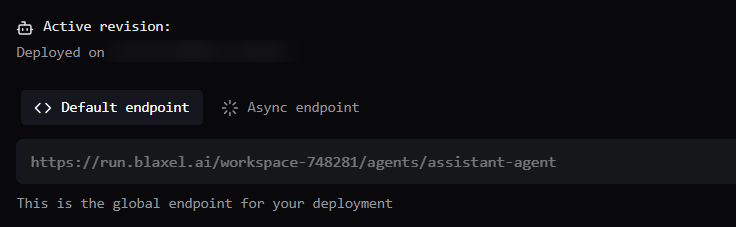
8. Test the agent on Blaxel
By default, agents deployed on Blaxel are not public. All agent requests must be authenticated via a bearer token. Requests can be made either via the Blaxel API or the Blaxel CLI. Test the deployed agent by sending an authenticated request to its global endpoint (update the endpoint URL below with the correct endpoint URL for your agent, and modify theprompt as desired):
Resources
Want more info on developing and deploying agents on Blaxel? Check out the following resources:Connect to a Blaxel sandbox from Claude Agent SDK
Build an agent with Claude Agent SDK that can operate a Blaxel sandbox using MCP.
Give compute to your agent with the TypeScript SDK
Complete guide for using the TypeScript SDK to develop an agent using Blaxel services.
Give compute to your agent with the Python SDK
Complete guide for using the Python SDK to develop an agent using Blaxel services.
Deploy your agent code to Blaxel
Complete guide for deploying AI agents on Blaxel.
Manage environment variables
Complete guide for managing variables and secrets when deploying on Blaxel.